
Participant
October 1, 2024
Answered

Adding files stops me from being able to edit my project

  • October 1, 2024
  • 1 reply
  • 706 views

I'm not sure if this is a bug so I'm hoping that someone can tell me if I'm doing something wrong.  I've recently been having an issue where I will be editing a video and I go to add a file.  If I add a file, I can no longer edit my project.  The program doesn't crash, but it does not allow me to continue editing anything.  I've never had this issue in the past so I'm not entirely sure what changed.   Also, it doesnt matter what file type I'm importing.  It applies to photos and videos as well.  No error message appears at all during any of this.  Its almost as if my project is frozen?


Please help.
This topic has been closed for replies.
Correct answer Averdahl

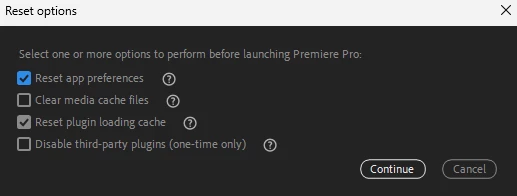
Try to reset the Preferences. This do often solve odd issues like this.


Close Premiere Pro, hold down the Shift-key while you Premiere Pro again and select Reset app preferences in the dialog that pops up. 


quote

Whenever I add any additional files this happens.  It does not let me click to edit anything on the timeline and I lose use of any other editing tools. 


By @Rylee33666429ijyi


1 reply

Kevin-Monahan
Community Manager
Community Manager
October 2, 2024

Odd. Which version of Premiere Pro are you using? Can you show us a screen movie or screen capture showing the issue, @Rylee33666429ijyi?


Thanks,
Kevin

Kevin Monahan - Sr. Community & Engagement Strategist – Pro Video and Audio
Participant
October 2, 2024

Hi Kevin, I have version 24.6.1. Unfortunately I can't replicate exactly what happens through the project I mentioned above at this moment.  I can send a video some time tomorrow.  I'll mention you directly.