MahaB82A
September 1, 2025
Answered

Adding text to outside of a short reel edge
  • September 1, 2025
  • 2 replies
  • 214 views


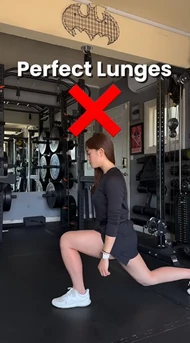
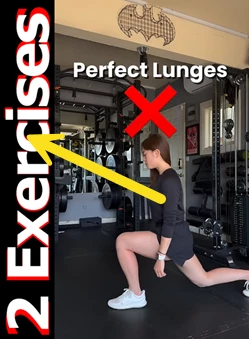
Above is a short reel video. I want to add text to that video as below. I tried with adjustment layer but it did not work. How to do it? 
 

Correct answer Ann Bens

To extend the frame, you will have to change the sequence settings

Or make a new one and copy eventing over.

But then if you going to play this vertically on a phone you probably have black bars top and bottom

2 replies

Ann Bens
Community Expert
Ann BensCommunity ExpertCorrect answer
Community Expert
September 1, 2025

To extend the frame, you will have to change the sequence settings

Or make a new one and copy eventing over.

But then if you going to play this vertically on a phone you probably have black bars top and bottom

MahaB82A
MahaB82AAuthor
September 1, 2025

Thanks for the help.

Community Expert
September 1, 2025

Use the rectangle tool to draw the black rectangle. Use the type tool to create the text and position the text.

You can use the properties panel to treat the text how you like. Additionally. You will will a little of the picture on the left side unless you resize the sequence to accomodate the rectangle/text.

MahaB82A
MahaB82AAuthor
September 1, 2025

I have a standlone text layer in PNG format. Only thing is I have to extend the left side of the above image & place the layer. In Photoshop there is a tool to extend the image. Is there any similar tool in Pr? I mean in the effect.
