Participant
September 18, 2018
Answered

Adjustment Layer and Essential Graphics

  • September 18, 2018
  • 5 replies
  • 5518 views

Hi All,

I am building graphic templates in the Essential Graphics tool. We want behind out our graphics to be a standard 'frosted glass' effect. Currently I achieve this by using a separate adjustment layer. Ideally I would like to add the frosted glass to the graphics to utilize the standard "responsive desgin" to achieve standard look across all templates.

I do not like the look of trying to frost a colored rectangle (white or gray) I think the best looked is through the adjustment layer so that it is clear with the frost attached.

Has anyone had success in linking an adjustment layer to an essential graphic template to fully utilized the Responsive Design feature?

Thanks!
This topic has been closed for replies.
Correct answer Kevin J. Monahan Jr.

You know something weird? I tried the very same recipe for this effect that worked for me on my more powerful MacBook Pro here at work, but my 2013 MacBook Pro at home gave me a black screen instead of the blurred and cropped background image. I'll continue to investigate. It may be a question of having a powerful enough computer to pull this effect off.

After thinking about it, I found that an Adjustment Layer inside the EGP is completely unnecessary. It really doesn't do anything since the effect stands complete without it.

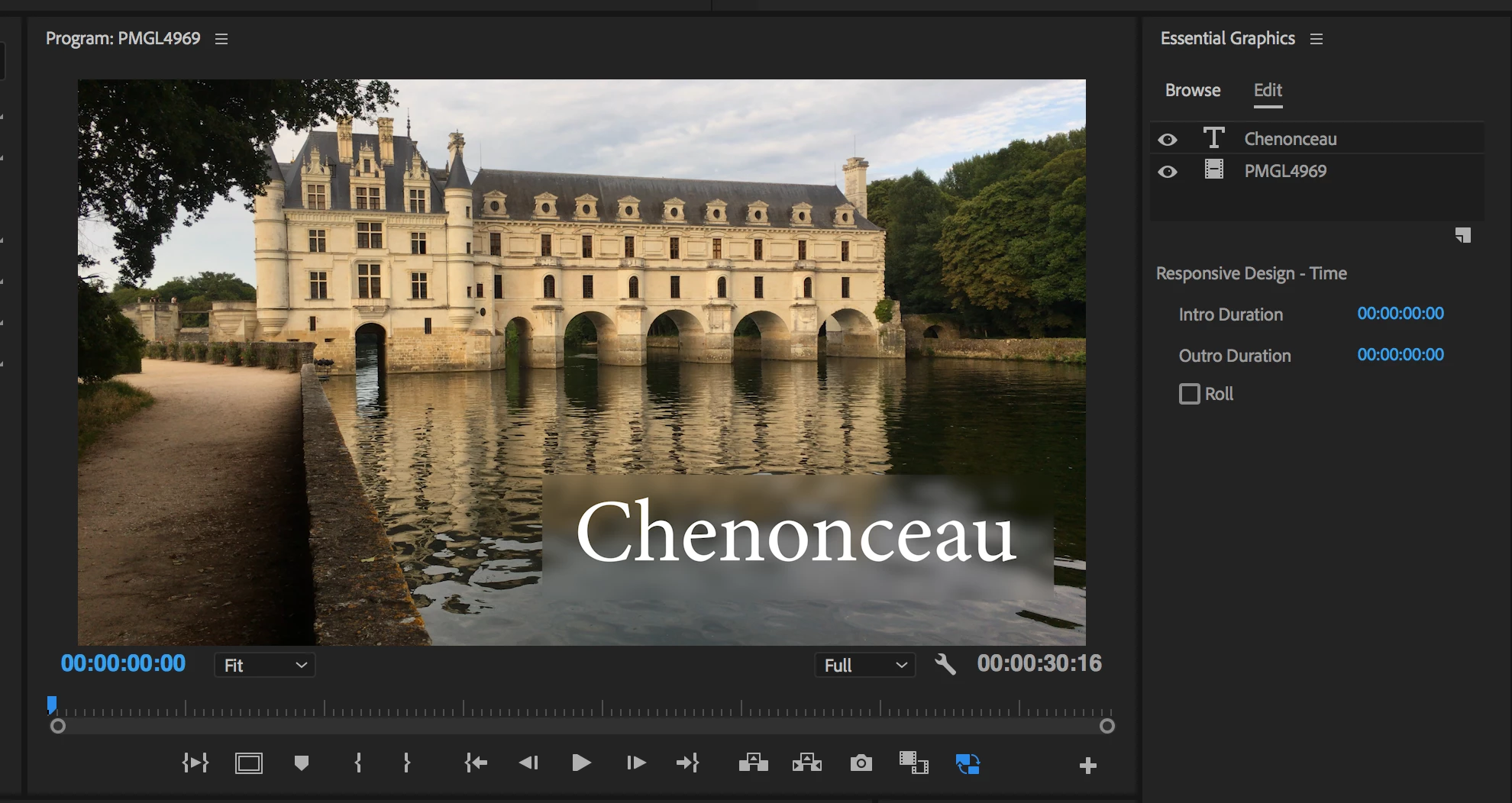
Here's what I came up with.

You can make a mogrt out of this, but of course, to customize it for your "frosted glass" effect, you have to drag in the same video clip to the bottom of the stack in the EGP (and the top of the stack in the ECP, as it has its sorting in reverse order from the EGP).

This was a fun problem to solve, by the way.

Thanks,
Kevin

5 replies

DaciaSaenz
Inspiring
November 17, 2020

Building something out like this with an AE Mogrt is now possible in a more direct way!

Exciting news update!!
It's now possible to add videos to the Mogrt from within PR so that any of your, transitions, animations effects, and blend modes will be applied to the video you feed the Mogrt.

This feature is now in public beta in AE and Premiere Pro.

Here’s more info: https://www.youtube.com/watch?v=Akp8aXF-iwM&feature=youtu.be

Let us know what you think!

- Dacia Saenz, AE & PR Engineering Teams
Kevin J. Monahan Jr.
Legend
September 19, 2018

BenD,

Sorry you are having trouble setting up this template.

Adjustment layers (like the one I use to create my frosted glass effect) cannot be added to the essential graphic layers.

Actually, they can be. Just drag them into the stack in the EGP. Keep in mind that if you apply an adjustment layer in this fashion, you also have to drag the same source clip into the EGP so that it can affect a source that's also in the panel—in your case, it's the clip on V1.

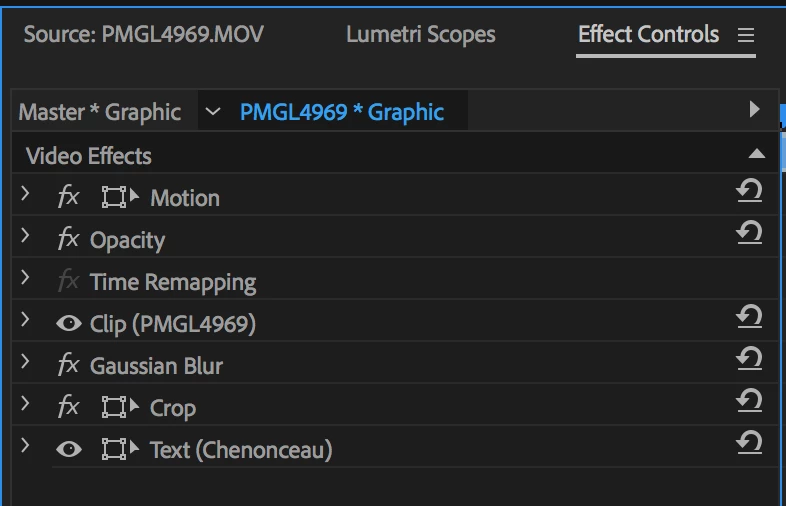
Blur and Crop is added in the ECP:

Again, the only issue is that if you made a mogrt in this fashion, you'd need a new source layer for the fill to match the video clip on V1. So, for this to work as you'd expect--create the template without the fill (blurry image you call "frosted glass") and then, when you have a new image that needs this title treatment, add that manually to the bottom of the stack in the EGP.

So for this, you get both responsive design and the opportunity to place either the same source (the V1 clip in your case) or any other source you desire as the fill—an image of a soft red drape, for example.

So this works, but probably not as you hoped as it would work (without manual adjustment). A mogrt is not smart enough to reach outside its container and see the same frames from a source on another external clip and then apply them back in the template. You have to tell it which clip to use for each unique case. So you get most of the way there, I think.

Let us know if this technique helped you achieve what you wanted. If it did, please mark it as correct. If it is completely unsatisfactory, please indicate what you would like in a feature request here.

Thanks,
Kevin

Kevin Monahan - Sr. Community and Engagement Strategist – Adobe Pro Video and Audio
Kevin J. Monahan Jr.
Kevin J. Monahan Jr.Correct answer
Legend
September 20, 2018

You know something weird? I tried the very same recipe for this effect that worked for me on my more powerful MacBook Pro here at work, but my 2013 MacBook Pro at home gave me a black screen instead of the blurred and cropped background image. I'll continue to investigate. It may be a question of having a powerful enough computer to pull this effect off.

After thinking about it, I found that an Adjustment Layer inside the EGP is completely unnecessary. It really doesn't do anything since the effect stands complete without it.

Here's what I came up with.

You can make a mogrt out of this, but of course, to customize it for your "frosted glass" effect, you have to drag in the same video clip to the bottom of the stack in the EGP (and the top of the stack in the ECP, as it has its sorting in reverse order from the EGP).

This was a fun problem to solve, by the way.

Thanks,
Kevin

Kevin Monahan - Sr. Community and Engagement Strategist – Adobe Pro Video and Audio
Mike Dziennik
Community Expert
Community Expert
September 19, 2018

So build it in Premiere and then export the Mogrt from Premier?

Participant
September 19, 2018

My problem which is apart of the intial question at the begingin of the thread is that Adjustment layers (like the one I use to create my frosted glass effect) cannot be added to the essential graphic layers. I would like this to be a part of the graphic template to help with the work flow.

MyerPj
Community Expert
Community Expert
September 19, 2018

Sorry, I was just trying to duplicate the look in AE that you have in PP. I think I have that, but there was more to your question. Cheers.

jasontcox
Inspiring
September 18, 2018

This would make for a pretty great feature request however

Premiere Pro: Hot (2461 ideas) – Adobe video & audio apps

R Neil Haugen
Legend
September 18, 2018

This is a workflow that is best done with an AfterEffects comp to create the mogrt to be used in PrPro. Ae mogrts can include clips and graphics and all sorts of things.

Neil

Everyone's mileage always varies ...
Participant
September 19, 2018

Hi Neil,

Thanks for the thought. My problem is that I need a consistent frosted glass effect to be built in the graphic that is apart of the key. I am trying to avoid rebuilding the layers in premier each project. Your solution for using after effects I have tried just would need to open AE each time and therefore almost negate the use of templates because the project would be fully open.

I have attached for the difference between the frosted glass effect between premier & AE, I could build the template in AE if the frosted glass looks the same and I can templetize it without a video clip to maintain the alpha channel.

After Effects -

Premiere -

Thanks!

Mike Dziennik
Community Expert
Community Expert
September 19, 2018

Are you trying to make it look like the After Effects still above? Surely this is just a white rectangle with a low opacity, which can be done in Essential Graphics in premiere. Or am I missing something here?