Correct answer MyerPj

Well, maybe the 'god of this world' (2 Corin 4:4), but not the god of the universe. (Psalm 83:18).

🙂

Try a new project, import in the clip, drop it into an empty timeline, then create the Adjustment layer and see what you get.

10 replies

MyerPj
Community Expert
Community Expert
April 26, 2025

Did you try creating a NEW adjustment layer, after you fixed the aspect ratio in Sequence Settings?

igor_4258Author
Participant
April 26, 2025

Yes, still doesnt work

I think god is going against my plans to become a video editor


MyerPj
Community Expert
MyerPjCommunity ExpertCorrect answer
Community Expert
April 26, 2025

Well, maybe the 'god of this world' (2 Corin 4:4), but not the god of the universe. (Psalm 83:18).

🙂

Try a new project, import in the clip, drop it into an empty timeline, then create the Adjustment layer and see what you get.

R Neil Haugen
Legend
April 26, 2025

Did you make the adjustment layer for that sequence? Premiere ALs are a sized thing, so they normally fit a sequence if you make them for and from that sequence.

Everyone's mileage always varies ...
igor_4258Author
Participant
April 26, 2025

I believe i have the sequence correct


Ann Bens
Community Expert
Community Expert
April 26, 2025

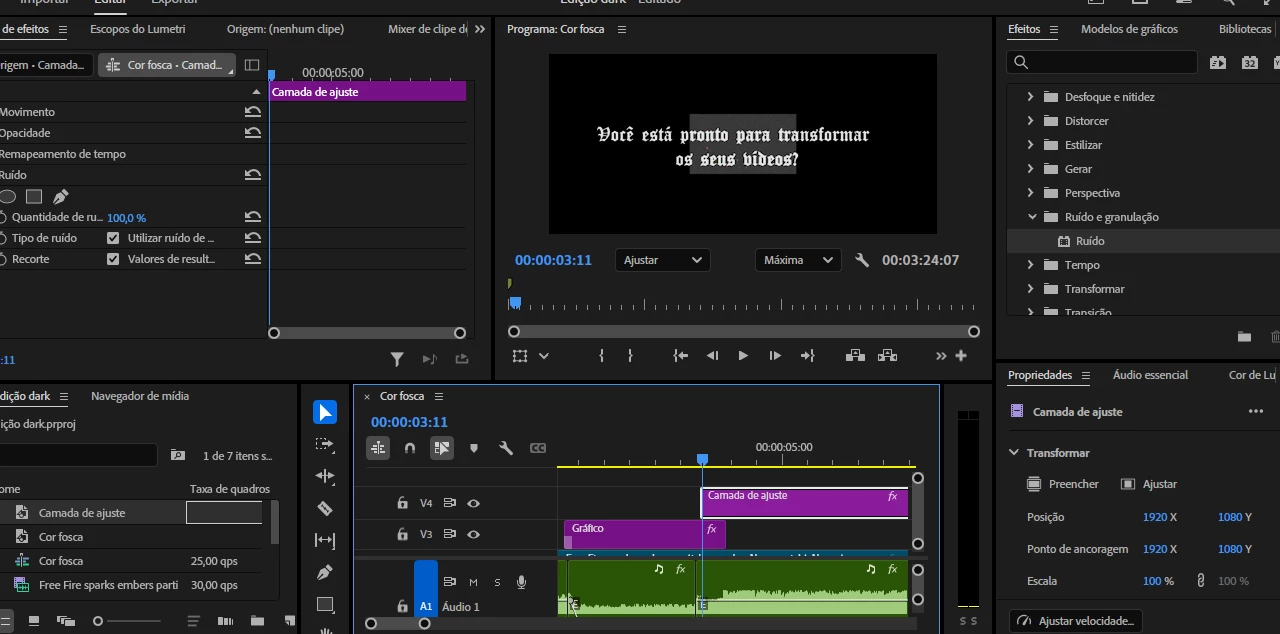
Your pixel aspect ration is incorrect: should read 1.0 and not D1/DV

You have an effect with a mask on the adjustment layer; hence the 'odd' size.