
Adobe CEP issue with setAudioChannelMapping
Hello,
I've been working with Premiere Pro scripting and encountered an issue with the projectItem.setAudioChannelMapping function. This function takes a parameter of projectItem.getAudioChannelMapping object, which generally works as expected.
For example, consider the following code:
var seq = app.project.activeSequence;
var clip = seq.audioTracks[0].clips[0].projectItem
var mapping = seq.audioTracks[0].clips[0].projectItem.getAudioChannelMapping
mapping.setMappingForChannel(0, 0); //
mapping.setMappingForChannel(1, 0);
clip.setAudioChannelMapping(mapping);
So this code works just fine except if you have multiple audio clips in the sequence that come frome the same project item:
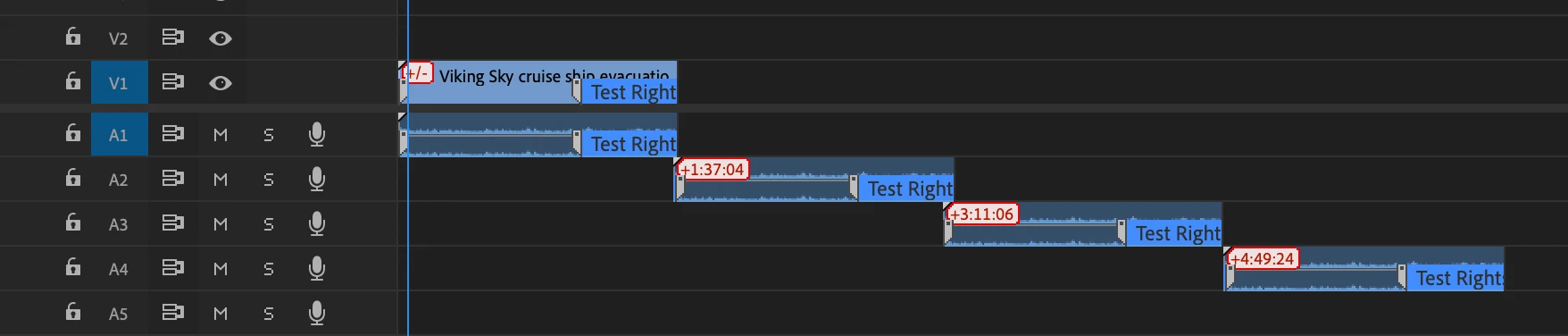
In this case when you modify the audio mapping object for either audio clips and set the audio channel mapping, all of the audio clips will be changed and not only the one that is "selected" in the code . Somehow each clip is using the same instance of the projectItem.setAudioChannelMapping object.
@Bruce Bullis is there anyway that this can be addressed ? Much appreciated


 AdChoices