dianam8183404
Participant
April 28, 2017
Answered

Adobe Encore and Closed Captions

  • April 28, 2017
  • 1 reply
  • 2129 views

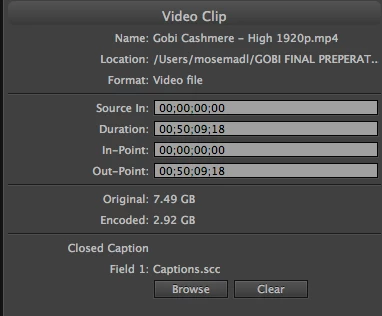
I used Movie Captioner to export a .scc file to add to a DVD project in Encore. I've attached a screen shot of the properties data once I've done this. After I build and burn the DVD I test it in iDVD Player with the captions on and they do not show.  Anyone know why?

This topic has been closed for replies.
Correct answer Stan Jones

Thanks Stan,

So if I export as a .m2v instead and import that to the timeline, it might behave itself? And yes the menu audio seems to work OK.


Perhaps...

The most reliable workflow is to export your asset as I described. You get an m2v and audio file (wav or a3c). I would create a new Encore project as a test, add one menu, then import "as timeline," selecting the 2 files. Is the video "do not transcode"? Then add the scc and see what you get. To test the scc, burn a test (rewritable) disk..

If that works, you can try to add it to your existing project, but Encore is not forgiving, and you may need to work in the new project and redo the menus.

1 reply

Stan Jones
Community Expert
Community Expert
April 29, 2017

Software players often get it wrong, so first test on a burned disk.

An mp4 is probably being re-transcoded in Encore, also suggested by the
"original" and "encoded" size. This should not effect captions, but it is not ideal. You want to see "do not transcode" in the project panel for that video file asset under the DVD Transcode Status column.

dianam8183404
Participant
May 1, 2017

Hi Stan,

Thanks for the reply. I don't have the option 'do not transcode'. I have the default setting 'untranscoded', the settings force you to pick a codec and all that stuff. So once you start building it transcodes anyway.

Stan Jones
Community Expert
Community Expert
May 1, 2017

It could be a problem with the settings in the mp4. But Encore "prefers" demuxed files (an m2v and wav or a3c) rather than mp4.

As I said, this may have nothing to do with the scc problem.

Also, some mp3's create problems for Encore. I assume this is for the menu and is working correctly?