Adobe Freezes and crashes up to 6 times an hour
It seems that the dynamic link manager could cause some Problems. But Premiere also Freezes and isn't able to respond while trying to export too. So the dlm can't be the only reason that causes those crashes and freezes.
Versions
Adobe CC 2015.3 (can't update because of company given safety restrictions)
Windows 10
PC Specs
Intel Core i7-5820K CPU @ 3.30 GHz
32 GB RAM
NVIDIA GTX 1070
Samsung SSD 850 EVO 500 GB (CC is installed on it and it has 200 GB free space left)
Displays Specs
1x Displayport on HP E231 (1920x1080 @ 60Hz)
1x DVI on HP E231 (1920x1080 @ 60Hz)
1x Displayport on AOC U2879VF (3840 x 2160 @ 60Hz)
What's the problem?
Almost 75% of the time I am trying to drag and drop an after effects comp into the premiere timeline premiere freezes and has to be shut down. You see the typical blue windows 10 loading circle and the "premiere doesn not respond" in the top bar. That sometimes happens already when I am trying to import an after effects comp, so before I try to drop it into the timeline.
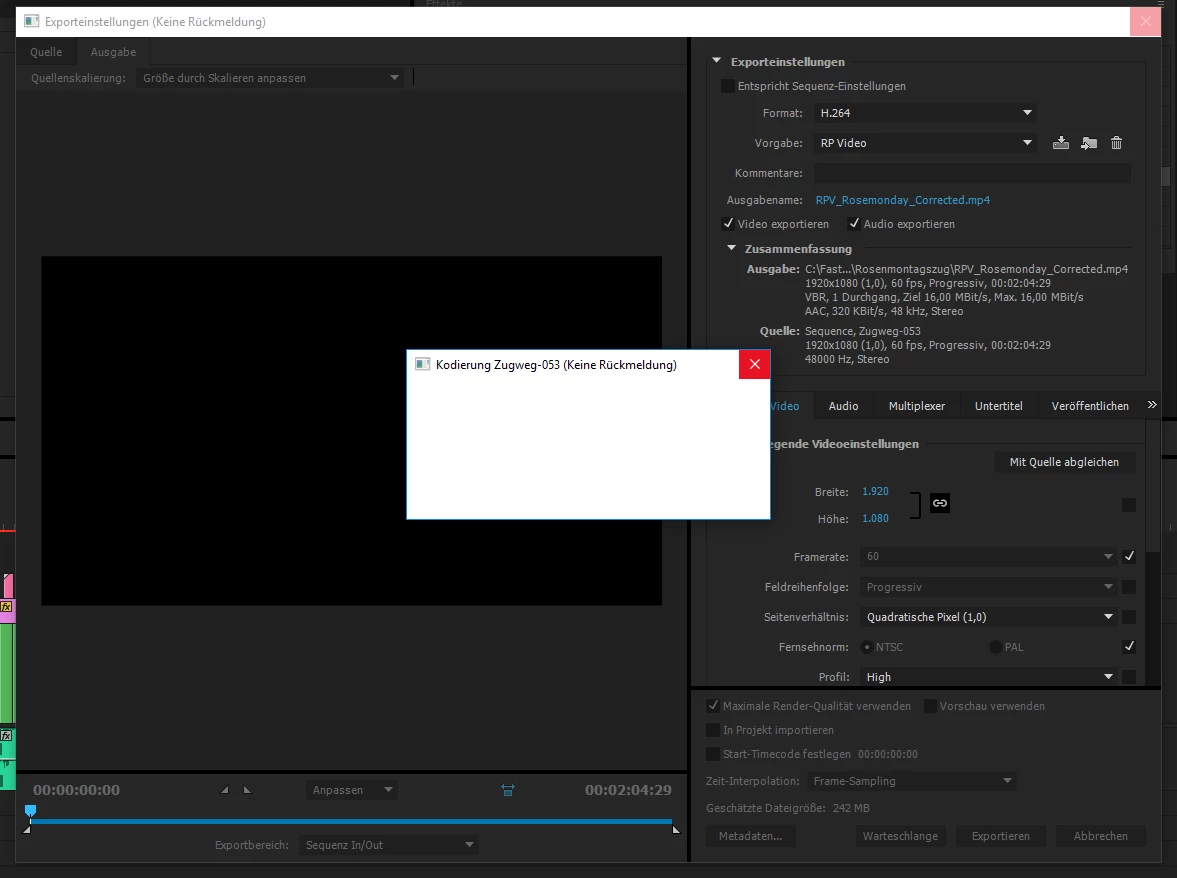
Also Adobe freezes 75% of the time during, not to say before the exporting-process. Export settings can be seen in the screenshot, also the empty/white messagebox that appears in those situations.
Assumptions
- Could it be a problem with the different display resolutions ?
- Could it be a problem with the different ways the displays are connected on ?
- Is this a known bug in the CC 2015.3 ?
This really stops me from doing my job. I hope someone has a solution for it.
THANK YOU VERY MUCH
 AdChoices