
Adobe Premier Audio Channel Assignments
Hi there,
I'm attemping to export a Apple ProRes 422 HQ file with discrete 5.1 + Lt/Rt audio on channels 1-8 (L, R, C, LFE, Ls, Rs, Lt, Rt). However, some tracks in the original file were out of order / empty and I needed to do some rearranging, as seen below.
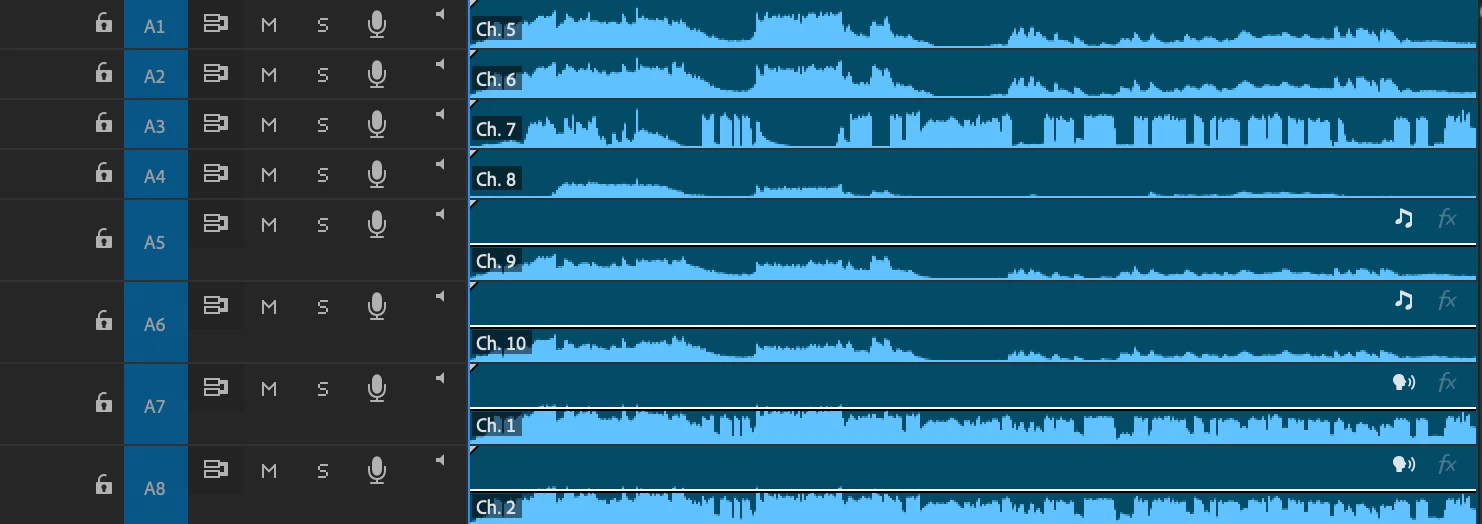
I am now running into an issue when exporting - I have the audio channel configuration set to channels 1-8, discrete. What I think I need to do is make it so that tracks 1-8 are also channels 1-8. But I'm not sure how to do that. If I select the audio in track 1 and select channel 1 in "audio channels," the track then becomes what I have as channel 1 down in track 7.
I hope this isn't phrased too confusingly. Essentially, what I think I need is tracks 1-8 to also be channels 1-8, without changing what's on the source tracks. Anyone have ideas on how to do this? Thank you very much for any assistance!
-Cal


 AdChoices