
Participating Frequently
October 22, 2017
Answered

Adobe premier pro version 12 won`t import MOV files

  • October 22, 2017
  • 8 replies
  • 4156 views

Hello everyone

So after spending  2 days in the mountains video shooting with my drone  ,all the recoded files are in MOV format ,now sitting down to edit on

my new PC ,newly installed Adobe premier ,I am just surprised to see I can`t import any of them

the message I am getting ( unsupported format or damaged file )

I remember I didn`t have this  issue on Adobe premier C5 

Thoughts ?

Thanks !
    This topic has been closed for replies.
    Correct answer Bill Gehrke

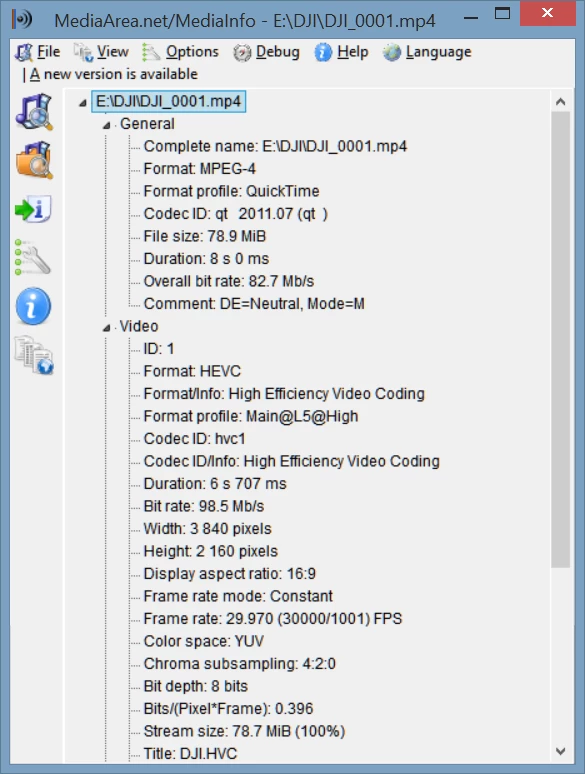
    Download MediaInfo and show the Tree view like this DJI file.

    This file plays beautifully in Premiere 11 and 12 on this 3+ year old laptop with no lost frames (now this sample file has no motion so that test maybe misleading).  This file as downloaded from a forum user was .DJI_0001.mov.  I simply renamed it to DJI_0001.mp4.

    8 replies

    Participating Frequently
    October 3, 2018

    Same happen with me..its just a copy paste error..
    copy again thos file from.. whr u copy last time..
    and replace them..it work

    (play all thos file with any player ..if they cant play it replace them)
    (no need to downgrade or upgrade ur software)

    Same happen with me..its just a copy paste error..
    copy again thos file from.. whr u copy last time..
    and replace them..it work

    (play all thos file with any player ..if they cant play it replace them)
    (no need to downgrade or upgrade ur software)

    (u cant import them .coz they r faulty files)

    and try to upgrade ur quick-time player

    Participant
    July 5, 2018

    This has not been answered or resolved. No matter what I do, I cannot upload a video file to premier pro CC 2018. The audio plays and the video does not. My files are .mov. I have converted to mp4 to no avail. mpeg2 to no avail. Changed through adobe encoder. Nothing is working.

    At this point, I dont know what else to try except to simply go to a non adobe product.

    Bill Gehrke
    Bill GehrkeCorrect answer
    Inspiring
    October 24, 2017

    Download MediaInfo and show the Tree view like this DJI file.

    This file plays beautifully in Premiere 11 and 12 on this 3+ year old laptop with no lost frames (now this sample file has no motion so that test maybe misleading).  This file as downloaded from a forum user was .DJI_0001.mov.  I simply renamed it to DJI_0001.mp4.

    Participating Frequently
    October 24, 2017

    So I will answer here so people who are suffering can find relief ..

    it is more complicated than I thought and I I had to use DJI users brains to help me

    1- I have DJI Phantom pro 4 ,I shot in 4K , it produces footage with MP4,MOV file format ,either one I could`t import to PrPro

    I am using windows as OS .

    2- I changed the format to MPG ,others suggested change it to AVI ,MP4 ,etc ,non worked for me except MPG

    now this solved the import problem but the footage was so slow to run and dropping frames, I know some one might say  this is 4k ,but my PC is supposed to handle 4k , another problem was exporting the project ,Adobe crushed many times and couldn`t render the project .

    3- run Adobe media encoder

    4- Transcode the footage to Cineform codec using Gopro codec

    5- This will transform your MPG to MOV which is NOW  PrPro friendly but it is huge ,which is not a problem to me since I don`t have space issue on my pc

    6- Now I am running 4k footage on  Adobe Premier smoothly and no issue what so ever with rendering and exporting to 4K as well .

    Here is a link of Youtube video for more help with Edit 4K Footage Easy with Adobe Premiere Pro and Cineform - YouTube

    Participating Frequently
    October 23, 2017

    I forgot to mention ,they are 4k files ,it seems it is universal problem to all DJI drone users as I gleaned from my search

    Participating Frequently
    October 23, 2017

    So it seems this is one of the most frustrating common problem all premier users run in to ,I have pulled my hair enough today

    We are in 2017 and Adobe developers have not been able to figure this out ,It is time to uninstall it ,terminate this free trial and search for another software that can import MOV file .

    kulpreet singh
    Inspiring
    October 24, 2017

    Hi Zahera78361587,

    I am sorry that you are facing trouble importing your DJI footage into Premiere Pro.

    What is the exact model of your DJI drone?

    Which OS are you on and where exactly is your footage located?

    Thanks,

    Kulpreet Singh

    Ann Bens
    Community Expert
    Community Expert
    October 22, 2017

    Of course Premiere supports mov, its the codec that can give issues.

    Change mov to mp4 see it that will work,

    Participating Frequently
    October 22, 2017

    I changed format to MP4 ,AVI as some suggested on the web , nothing changed , thanks for trying to help

    John T Smith
    Community Expert
    Community Expert
    October 22, 2017

    MOV is basically an Apple product, so you need Quicktime from Apple to read the file on a Windows computer

    Since there are problems with QT (it is no longer supported by Apple) read below

    Remove Quicktime NOW http://blog.trendmicro.com/urgent-call-action-uninstall-quicktime-windows-today/

    -http://blogs.adobe.com/creativecloud/apple-quicktime-on-windows-update/

    -and http://blogs.adobe.com/adobecare/2016/04/16/quicktime-on-windows/

    -I do not have QT so I do not know how this is done, but I did read a message that the QT player is the problem, so if you select an option during QT install to install ONLY the codecs, and not the player, you won't have security problems

    -I do not have any part of Quicktime installed on my Win10 computer, but I did install VLC which "seems" to have installed "something" which allows me to edit my Canon camera MOV files in Premiere Pro

    VLC Player http://www.videolan.org/vlc/index.html

    -I've never done so, but VLC is said to be able to convert video to a new format

    Participating Frequently
    October 22, 2017

    I uninstalled QT ,installed VLC ,nothing changed unfortunately ,but thanks for trying to help

    Nexahs1138
    Inspiring
    October 22, 2017

    PP CC doesn't support .mov AFAIK (Rule of Bethesda - is it a bug or feature, who knows) open them in Windows Movie Maker and save that as an mp4 (or any other file type) and you'll be able to import to PP

    Participating Frequently
    October 22, 2017

    Where can I get that movie windows maker ,it does not seem to be available on windows

    this seems to be my last hope now

    Nexahs1138
    Inspiring
    October 22, 2017

    Windows movie maker comes pre-installed on most Windows systems, if it is not already on yours then just Google it and you'll find a free download.