Participant
November 27, 2018
Answered

Adobe Premiere CC 2019 4k Scrubbing Problem

  • November 27, 2018
  • 1 reply
  • 874 views

Good day,

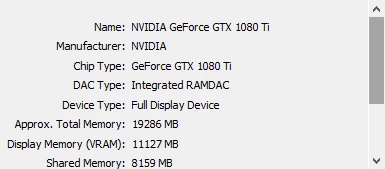
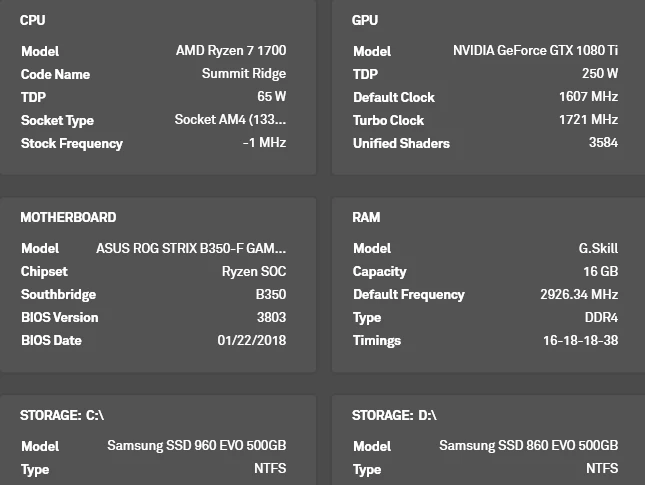
Would anyone by any chance know as to why I'm having problems scrubbing a 4k video downscaled to 1080, since I don't think I have an under powered rig (except for my ram maybe @ 16gb) but I even when scrubbing only 50% of the ram is being used. Also I think I've mostly done the "how to make premiere run faster"  tips on youtube.

If anyone could help me I would greatly greatly appreciate it.

Also, I've already ordered 32gb ram sticks, due to this problem.

Currently on the latest premiere as of Nov 27, 2018

Below are the my specs.
This topic has been closed for replies.
Correct answer Mo Moolla

This is the problem:

You scaled down the 4K to a 1080 but you are still actually playing back 4K footage.

You need to either create 1080 proxies or re-encode to 1080 in ME

Mo

1 reply

Mo Moolla
Legend
November 27, 2018

Hi

When you say your 4K raw footage was "downscaled" could you explain what process you followed to bring it to 1080?

Did you :

a) Proxy the 4K

b) Transcode down the 4K to 1080

c) Scale the 4K down on a 1080 sequence?

Mo

TsukemonoAuthor
Participant
November 27, 2018

that would be just scaled the 4k down on a 1080 sequence.

Mo Moolla
Mo MoollaCorrect answer
Legend
November 27, 2018

This is the problem:

You scaled down the 4K to a 1080 but you are still actually playing back 4K footage.

You need to either create 1080 proxies or re-encode to 1080 in ME

Mo