Participant
November 18, 2020
Question

Adobe Premiere isn't loading my projects

  • November 18, 2020
  • 6 replies
  • 1952 views

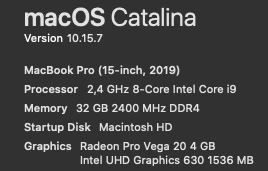
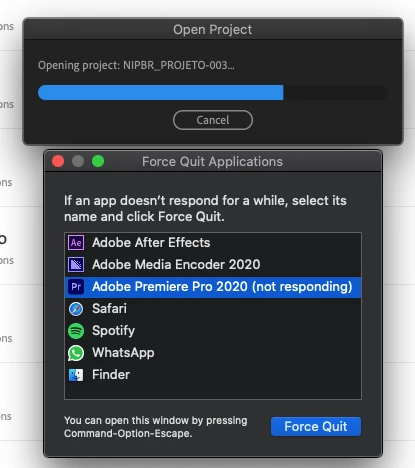
It's been a while that premiere isn't opening most of my projects. It starts to loading, when for no reason it stop responding. Every time that I need to open these projects that stopped to working, I need to open a new project and drag the broken project into the premiere and create a new file for it but next time I'll open it, it will stop responding and I need to do it again, and again, and again, creating 4 - 8 projects file per job.

I already did all the basics reccomendations and I don't know what else I can do. Please, it's annoying.
(Only premiere is having this issue. All that others softwares are fine! 

This topic has been closed for replies.

6 replies

Known Participant
January 8, 2021

Same issue here.  For now my only solution is to create a new project then import the previous project I was trying to work on into it.  This is a terrible work around.  hop this is fixed soon

Participant
January 8, 2021

IT GOT FIXED FOR ME! It was a VST which was not letting Premiere loading. In this case, the VST was an audio EQ - FAB Pro 3. I had to unistall and all the projects who previous showed the issue, could be loaded.

Known Participant
January 8, 2021

I don't have anything like that installed.  I don't think? 

Participant
December 9, 2020

IT GOT FIXED FOR ME! It was a VST which was not letting Premiere loading. In this case, the VST was an audio EQ - FAB Pro 3. I had to unistall and all the projects who previous showed the issue, could be loaded.

Participant
November 19, 2020

im having the same issue. Every time i open a project it crashes.


autorickshawpics
Participant
December 9, 2020

I've been having this problem with every version of Premiere after 14.3.2, including the latest, 14.7. When will it be fixed? At least I finally know what's going on! I keep hoping they'll fix it with every update to no avail.

ScottieB1
Known Participant
November 19, 2020

Ok, this problem is getting more and more frequent for me.

I updated to 14.6 and the first time it opened my project just fine, so I thought I was good. This morning, however, with a fresh boot of my system, Premiere hangs on opening the very same project.

On opening task manager (I'm on Windows) I noticed a bunch of stuff running that started with "Adobe". So I did end task (force quit) on all of it. There were maybe 5 or 6 different ones, and "Adobe CEF Helper" would just instantly restart itself, and there are 4 instances of it, using various amount of RAM. I couldn't get it to stay quit. Anyway when I opened premiere and then my project again after quitting all those processes, it worked! The project opened right up! 

Curious if this is a coincidence, so maybe give it a try?

Added an image my screen of where it hangs... 

Rag and Bone
Community Expert
Community Expert
November 19, 2020

As I posted in a similar thread:

I'm having the same problem with some, but not all, projects.

I find I can open the problem files in the beta version of Premiere.

Not ideal, but better than nothing!


Mac OS 10.15.7

Community Expert
November 18, 2020

From the outset I tell you that Catalina sucks, but try to open your Premiere Pro project with all the other applications closed, all of them.

Byron.
Participant
November 18, 2020

Unfortunately it doesn't avoid the "crash". It looks so simple and I'm getting pissed about this. When it started to happened, didn't stop since then.

ScottieB1
Known Participant
November 18, 2020

Same problem here on Windows since 14.5 update. Not every single project but it's happening more frequently today than w hen it first started.