Participant
December 19, 2020
Question

adobe premiere pro 2020 doesn't see or use my gpu
  • December 19, 2020
  • 2 replies
  • 277 views


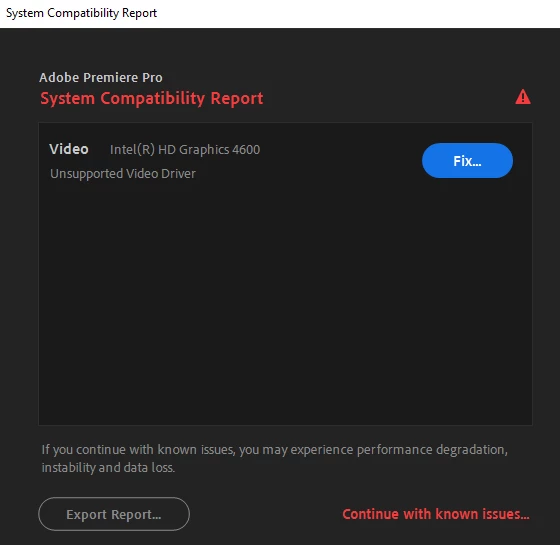
Ok so I have a weird issue recently I installed premiere 2020 and everytime i try to start the program i got this message ,,system compatibility report'' ,,unsupported video driver'' and it shows an integrated intel graphics...


it seems like adobe premiere pro 2020 is not even seeing my gpu  and i dont know why it only sees integrated intel grpahics card


how can i change that

i want it to see my dedicated rtx card and not integrated intel card...


This topic has been closed for replies.

2 replies

Legend
December 19, 2020

You have gotten things mixed up. The lack of a compatibility warning means either of two things:

  • The GPU hardware supports GPU acceleration and the driver is valid for the version of Premiere Pro that you're running, OR
  • The GPU hardware does not support GPGPU processing at all (in which case Premiere Pro is locked to the software-only mode).

If the compatibility warning pops up, it means that the GPU hardware technically supports GPGPU processing but the driver version installed has issues, or it is an obsolete GPU whose version of GPGPU processing (OpenCL and/or CUDA) is now no longer supported by either the GPU manufacturer or Adobe.


To cap it off, the integrated GPU of all 4th- and 5th-Generation Intel CPUs supports only OpenCL 1.2. OpenCL 2.0 or higher support is required for OpenCL-based GPUs in newer versions of Premiere Pro.


In the case of the Intel HD Graphics 4600, which is linked to the 4th-Generation Intel Core series CPUs, there have been absolutely no bug or compatibility fixes for these iGPUs since about 2017. Thereafter, only security fixes were included. Hence, driver support for the 4th- and 5th-Generation CPUs had been effectively ended by Intel itself.

Ann Bens
Community Expert
Community Expert
December 19, 2020

Disable the Intel in the bios (if possible).

Post comp specs.