
Adobe Premiere Pro 2025 Privacy and screen recording
Hey everyone, I’m running into a pretty concerning issue with Adobe Premiere Pro 2025 on macOS.
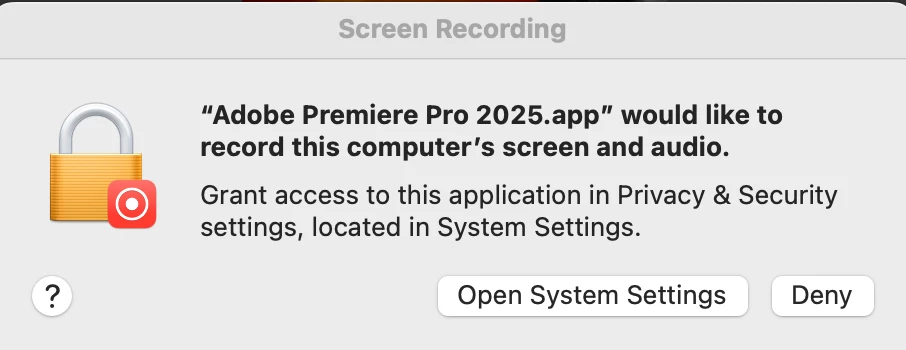
When I launch Premiere, macOS asks me if I want to allow “screen and system audio recording.”
I always hit Deny in the popup.
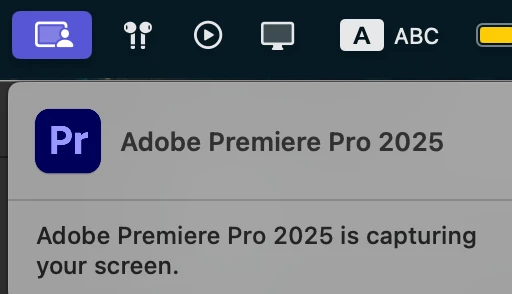
Despite this, macOS still shows a banner saying “Adobe Premiere Pro 2025 is capturing your screen”, and in System Settings → Privacy & Security → Screen & System Audio Recording, Premiere shows up as if it has access.
Screenshots: (attached)
This is especially worrying because I’m working on a project under NDA, and I cannot risk any unauthorized screen/audio capture.
My questions:
Has anyone else seen this behavior with Premiere Pro or other Adobe apps?
Is this a bug in macOS (permissions not enforced) or in Adobe Premiere itself?
Is there any way to permanently block Premiere from even requesting screen/audio recording?
Could this be related to background Adobe processes (Creative Cloud, CoreSync, etc.)?
Should I escalate this as a security/privacy vulnerability to Apple/Adobe?
I’ve already removed Premiere from the allowed list in System Settings, but the popup keeps coming back and it still claims to be “capturing.”
Has anyone managed to fully disable this? Any help would be huge.
Thanks in advance


 AdChoices