

Adobe Premiere Pro CC 2015 : Forgotten clip in assembly ....
Dear guys, they are caught with the forgetfulness of mounting a clip that should be placed more or less at the beginning of the fitting.
I know for sure that with the keyboard shortcut Ctrl + uppercase + V and selecting the forgotten clip and positioning me to the exact point where i would like the rest of the sequence to move the same time of the add sequence i fix the problem .... .
In fact, by performing all the procedure just exposed I get what I want (that is, it moves both the various video tracks and the various audio tracks) but you generate an astonishing situation (see the image posted below for clarity) ie the audio keyframes I do not undergo "NO" movement, ie they DO NOT follow the track Audio 3 in step by step, what is the case because it is not enabled as A1 and A2?
Or?
I look forward to your help and advice
A sincere thanks
John 😉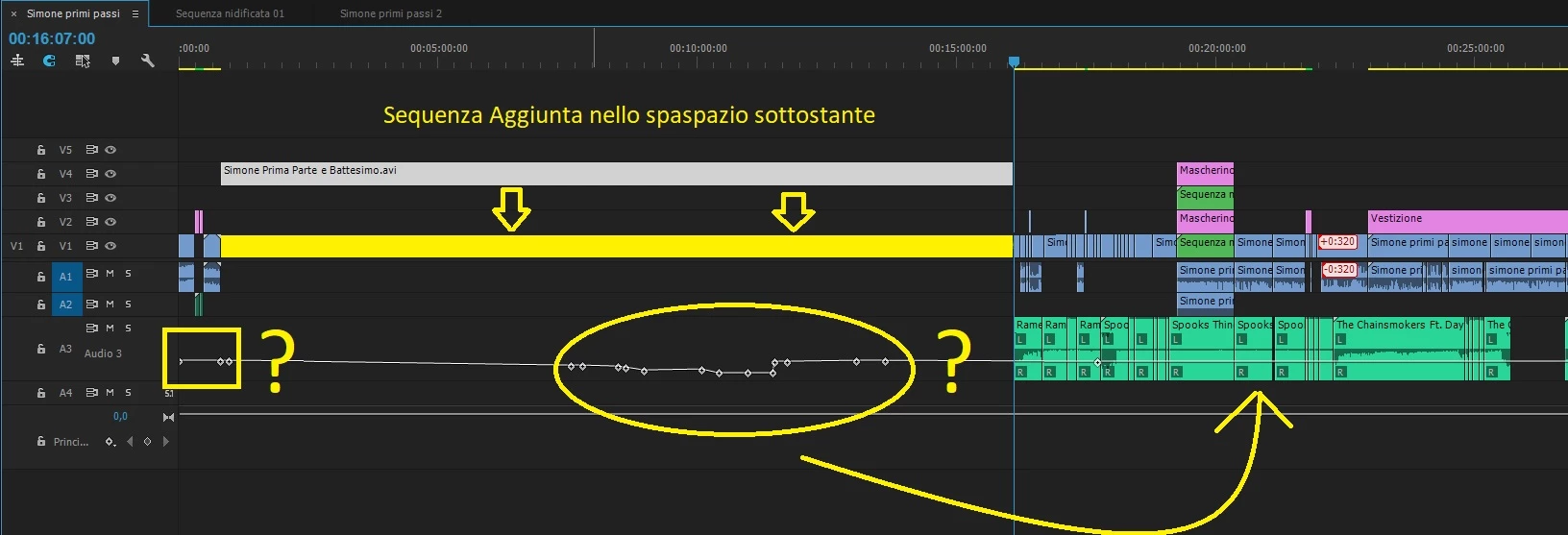
 AdChoices