
Participant
November 28, 2024
Question

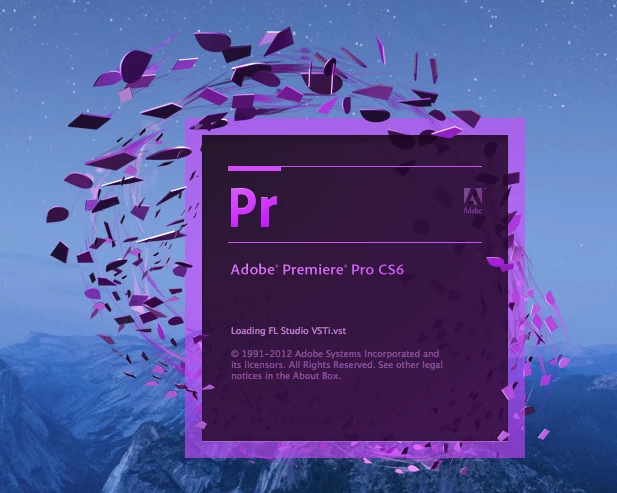
Adobe Premiere Pro CS6 Hangs on Loading FL Studio VSTi.vst

  • November 28, 2024
  • 1 reply
  • 256 views

I'm running Adobe Premiere Pro CS6 for Mac (old, I know, but it works for what I need). A while back, I installed FL Studio to experiment with a few things but never ended up using it much and uninstalled it by dragging it to the trash. When I started Premiere Pro the other day to work on a project, it hung on loading the FL Studio VSTi.vst as shown in the screenshot below. I've tried launching it with the keyboard shortcut before clicking that forces Premiere to rescan all plugins, reinstalling all my Adobe products, and verifying that /Library/Application Support/Adobe/Common/Plug-ins/CS6/MediaCore/ is empty. I would try the Adobe Creative Cloud Cleaner Tool, but it says my OS is too old to run the program. Other than restoring my OS to a previous date before installing FL Studio, is there anything else I can do to get Premiere Pro to work?
 

1 reply

Kevin-Monahan
Community Manager
Community Manager
January 23, 2025

Hey @bwever,

Thanks for the question and welcome to the forum. To run legacy software reliably, it's best to have a completely separate HD that has the proper OS installed to run such programs. Editors, especially, are put into this position to restore older projects, use a legacy feature, or transcode an ancient format that is no longer supported. That is the route I'd chase down. If possible, get a Windows 7 or 10 install going and then reinstall CS6. Is that at all possible? Let us know.


To fix your current install, you might search for any ancillary files that may need to be removed related to the app, like any VSTs, .dll files, and other such things that might be holding up launch other than somthing living in your plug-ins folder. Get Premeiere Pro running and then see if you can add back your other software. Good luckl.


Thanks,
Kevin


Kevin Monahan - Sr. Community and Engagement Strategist – Adobe Pro Video and Audio