Participant
May 7, 2017
Question

Adobe Premiere Pro CS6 - psd image darker in sequence than source monitor and timeline

  • May 7, 2017
  • 2 replies
  • 354 views

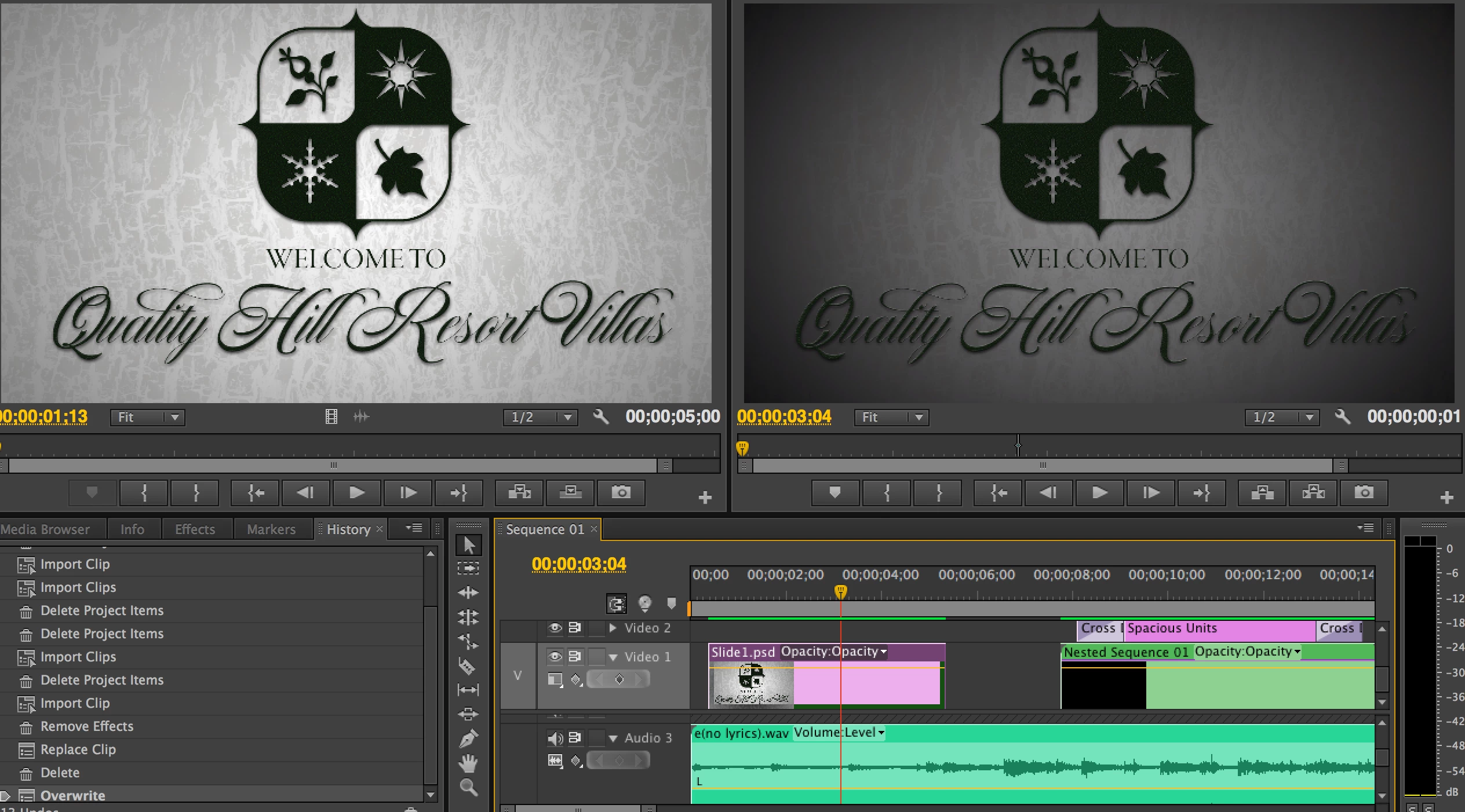
On Macbook Pro using PP CS6 - I have tried deleting this item from the timeline and re-insterting it and still comes out MUCH darker in the preview window than how it appears in the source monitor and the timeline thumbnail (and any other image viewer program, for that matter.) Cleared all effects, cleared media cache, restarted - all to no avail.
This topic has been closed for replies.

2 replies

Horshack
Legend
May 7, 2017

Based on your description it sounds like it has a lower than 100% opacity. To verify if this is the case, click on the wrench icon in the Program Monitor on the right and select "Alpha". If you see any shade of gray rather than pure white then the opacity is less than 100%. (you can compare the alpha to another clip to see how it should look with 100% opacity).

Ann Bens
Community Expert
Community Expert
May 7, 2017

Or a forgotten clip/adjustment layer stacked on a much higher track you are not seeing for the small hight of the timeline?

Participant
May 7, 2017

Quick note: The rest of the project does not have this problem, it seems to be just this asset.