
Inspiring
February 11, 2026

Adobe Premiere Pro keeps crashing on start up

  • February 11, 2026
  • 1 reply
  • 50 views

Hello

I have a Dell Pro Max 16 MC16250 laptop.

Storage 954 GB

Graphics card 8GB        Multiple GPUs installed

Installed RAM 32GB      Speed 5600 MTs

Processor          Intel Core Ultra 9  285H

System type      64-bit operating system, x64-based processor

Windows spec

Edition                 Windows 11 Enterprise

Version                24H2

OS Build             26100.7623

Experience         Windows Feature Experience Pack 1000.26100.275.0


I’ve used Adobe Premiere Pro for about 12 years. I was given the above work laptop in Nov 2025. To be honest I haven’t used APP since then - until this week. I have literally just opened the software and created a new blank file. Absolutely nothing else. I’ve then gone to make a cup of coffee. When I’ve come back I’ve seen the attached error message on my screen.
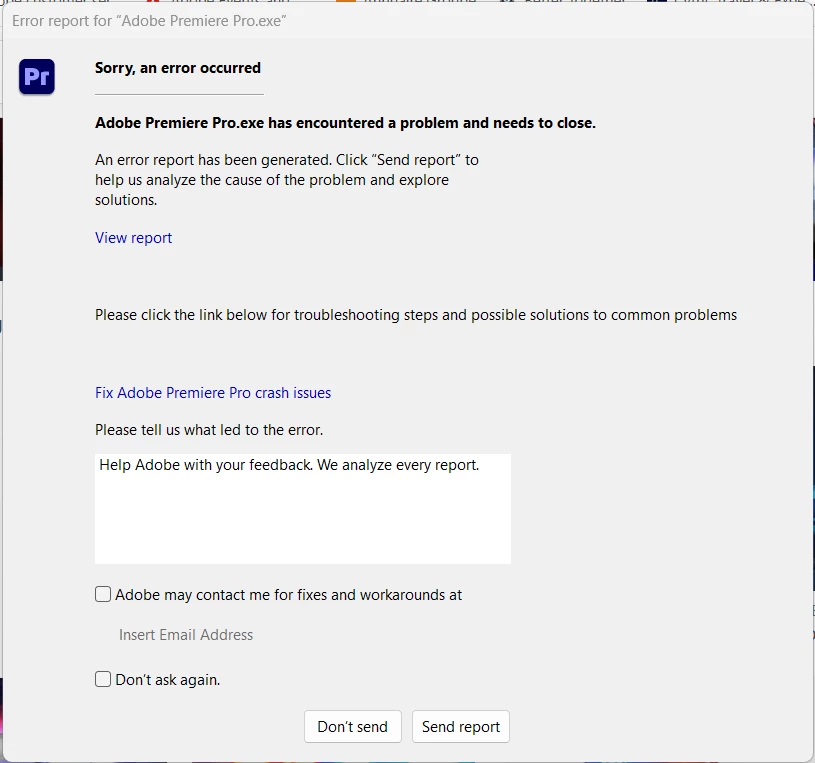
 If I click ‘send report’ or ‘don’t send report’, APP shuts down. This has now happened 6 times. I cannot get to the stage to actually do anything creative.

Any ideas?

    1 reply

    Community Manager
    February 11, 2026

    Hi ​@Jude5CC3,

    I’m so sorry to hear you can’t launch Premiere.  Did you install the software or did your organization?  I’m not seeing any bug associated with your email. If your Premiere is on your work account, can you private message me that email address so I can look up the crash report?  What version of Premiere are you using?  I hope we can assist you soon. Sorry for the frustration! 

    Jude5CC3Author
    Inspiring
    February 12, 2026

    Hi Rachel

    Thanks for your reply. Please can you conform if this is a private conversation or not. I can then send you my email address.

    My software was downloaded from an online company wide download app. I was using the latest version of APP - I’m on an annual license that allows me to download the latest version. Any help you can give will be most welcome.

    Community Manager
    February 13, 2026

    This is a public forum, but I have sent you a private message.