
keithm1972
Inspiring
November 21, 2022
Question

AE image darkened in Premiere Pro
  • November 21, 2022
  • 1 reply
  • 1471 views

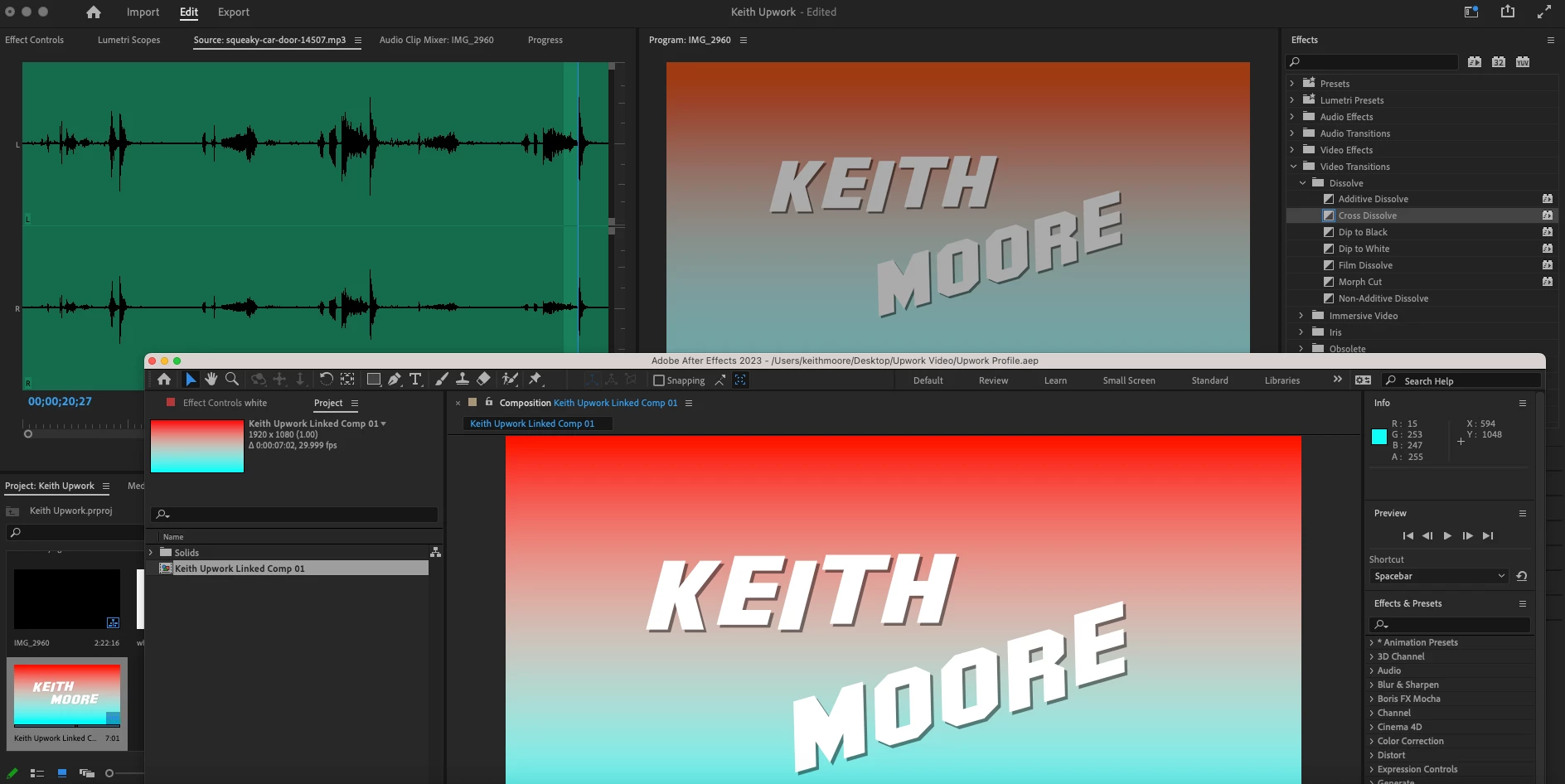
Good lord, can someone please tell me how to fix this madness? I created a simple matte in Premiere then opened it through dynamic link in After Effects to play with some titles. Then I review it in Premiere and the color is washed out.

(Screen shot above showing both projects opened.)


If I go to Sequence Settings and select "Rec.709" under Working Color Space it fixes the problem, but then blows out the video that follows this title page, fixing one problem to create another.

This topic has been closed for replies.

1 reply

R Neil Haugen
Legend
November 21, 2022

You have to have consistent CM throughout, and matching in both apps.


So what is the CM of your media, your sequence, and the CM in Ae?


Neil

Everyone's mileage always varies ...
keithm1972
Inspiring
November 21, 2022

Thanks for responding. I never set any color matching when starting the project, just using defaults. Right now the Premiere sequence setting for working color space is Rec. 2100 HLG.


In After Effects I go to Project Settings/Color and the working space is set to None. There are several Rec. 2100 options, but none of them exactly match "Rec. 2100 HLG". I tried them all anyway, but none of them normalize the brightness of the title matte in Premiere.


What's weird is this project is basically just a minute of video shot with my iPhone with a title added to the beginning of it. Creating the matte in Premiere and linking it to After Effects is where this problem began.

R Neil Haugen
Legend
November 21, 2022

In reality-ville, working in HDR at this time is the Wild Wild West. I work with/for and teach pro colorists. A few of them were the earliest adpoters of full DolbyVision/certification of their suite. And chosen by Dolby to do the training materials for all colorists working DolbyVision.


But most of the colorists I'm around have yet to deliver a single paid job in HDR. They're wokring at being ready, but the current stuff out there is problematic. Most screens either don't do HDR or do it ... weird.


At this time, ALL consumer screens, TVs and monitors apply ABL to the image to protect from screen-burn in of pixels. On some the user can turn it down a bit, but ... not completely off.


Which means as you are attempting to grade with such a screen, that if you have a long clip at any specific average brightness, in 30 seconds to a minute the screen will start darkening slowly ... so you don't really notice it changing ... and when you adjust your image because your scopes dropped, to get it back to as bright as you wanted it ... you've actually over-lightened that part.


Well now, when watching it, that will have a bump or jump in exposure because you corrected something that wasn't a 'program' issue.


The only screens that do not have that issue are above $17,000, most around $23,000-$30,000, and are rather difficult to get right now because the panel makers didn't have enough profit for those type screens.


So any corrections you do ... you need to then go back and watch through that at regular speed to see what happens. I'd also recommend cutting so your average screen brightness changes every 30 seconds to a minute. Which is frustrating, yea.


But what happened in that "Dragons" episode that was all "nighttime" is they decided to grade for a constant darkness at what they could see on their Sony or Flanders monitors. And be as dark as possible, as an "artistic decision". Which meant most of the mids/highs were actually only about 20-30 nits maximum.. And constant for 10-15 minutes at a whack.


As Vincent Teogh demonstrated with a TV side by side with a Sony BVM monitor, and outboard signal scopes ... after about 30 seconds, the TVs 'ABL' (auto brightness limiter) kicked in, slowly darkening the image over the next minute. Resulting in a TV image with the brightest non-specular below 10 nits.


But it was already dark, why did the ABL kick in? Because it stayed the same average brightness for over 30 seconds. That's all that it takes to trigger ABL.


So that's an issue you have to be aware of working in HDR whether you have a spendy accurate HDR grading monitor or not.


Next ... your OS and your monitor will have their own ideas of how to treat HDR media, and will apply things. And ... every screen out there will treat it differently than yours, the only guarantee in the colorist's trade.


So ... IF you need to work in HDR, accept that your program content will be seen all over the place, even worse than SDR/Rec.709 media. That's just Life at this time.


But .... for HLG clips in Premiere, on an HLG timeline, sent to Ae ... you have to find the HLG settings in Ae that work, and that's a pain as they DON'T use the same terminology in the two apps.


Try an HLG setting, with graphics white option of 203, and do uncheck "composite in linear color" ... and best wishes.


Neil

Everyone's mileage always varies ...