


Participant
August 23, 2026
Answered

After creating a mask with feather, my clip disappears during playback. I have tried tracking the clip, adjusting the keyframes and a host of other possible issues, but the clip disappears. What am I doing wrong? ...or is this a glitch?
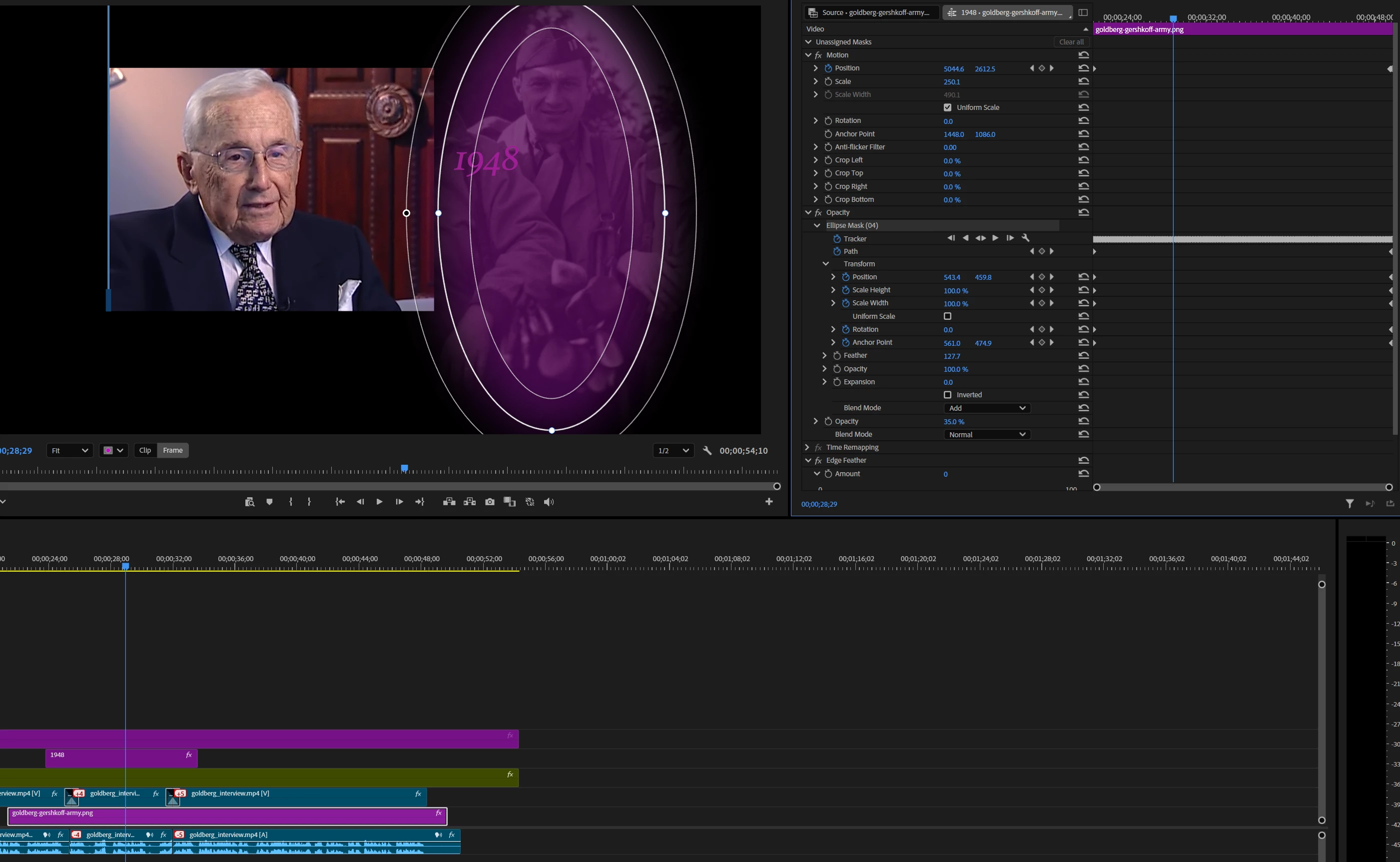
After creating a mask with feather, my clip disappears during playback. I have tried tracking the clip, adjusting the keyframes and a host of other possible issues, but the clip disappears. What am I doing wrong? ...or is this a glitch?

    Ann Bens
    Ann BensCorrect answer
    Community Expert
    August 24, 2026

    Thanks for the project.

    Its a know bug: set playback to FULL or render the timeline

    12 replies

    Participant
    September 23, 2026

    hola. Hago la edición de color, cuando exporto es otro video y todo movido. Necesito ayuda.

    Translate
    Community Manager
    September 25, 2026

    Hi athletic_Captaincc40,

    Welcome to the community! Could you please elaborate on the issue you’re experiencing while exporting? Is Premiere exporting a different video than the one shown on the timeline, or are you experiencing an issue with the mask in the exported video? Let us know, we’re here to help!

    Thanks,
    Sumeet

    Translate
    Participant
    September 23, 2026

    Having the same issue, any answer's here??

    Translate
    Community Manager
    September 25, 2026

    Hi itsme233,

    Thanks for your patience! This issue has been addressed in the latest Premiere Beta release. For testing purposes, would you mind creating a new project in the latest Beta version and checking if the issue is resolved? You may refer to this link to learn more about the Creative Cloud Beta program.

    Thanks,
    Sumeet

    Translate
    Ann Bens
    Community Expert
    Ann BensCommunity ExpertCorrect answer
    Community Expert
    August 24, 2026

    Thanks for the project.

    Its a know bug: set playback to FULL or render the timeline

    Translate
    Participant
    August 24, 2026

    Does not work in full either on my end. Interestingly enough, the rendered clip has it on export. If it’s s known bug, any idea as to when Adobe will fix it? Thanks again!

    Translate
    Ann Bens
    Community Expert
    Community Expert
    August 24, 2026

    I mean render the timeline (yellow to green) not export

    Translate
    Participant
    August 24, 2026

    ZIP file attached. Let me know if you see the same issue. As I said, during playback, the background image disappears. I've tried changing the opacity and it has no effect. This is one of many sequences I am using. I plan on using this masking effect as much as possible throughout the video for background vignettes. All the sequences are going to be spliced together onto a main master clip. I sincerely appreciate your help with this.


    Translate
    Ann Bens
    Community Expert
    Community Expert
    August 24, 2026

    Can you upload the project file


    Translate
    Participant
    August 24, 2026

    I tried setting it to 100%. It still disappears during playback. Also, I want to have the clip as a very faint overlay. How can I achieve both the lightened overlay effect and also have the mask showing on playback?

    Translate
    Ann Bens
    Community Expert
    Community Expert
    August 23, 2026

    Clip opacity is set to 35%

    Translate