
Participant
July 25, 2023
Answered

After Effects composition shifted to the left

  • July 25, 2023
  • 2 replies
  • 1277 views

I imported composition from After Effects into my Premiere timeline but the video is shifted. Part of the video from the right is placed on the left. (you can see part of the red sweater on the left) It's still like this after export. Everything is looking fine in AE.
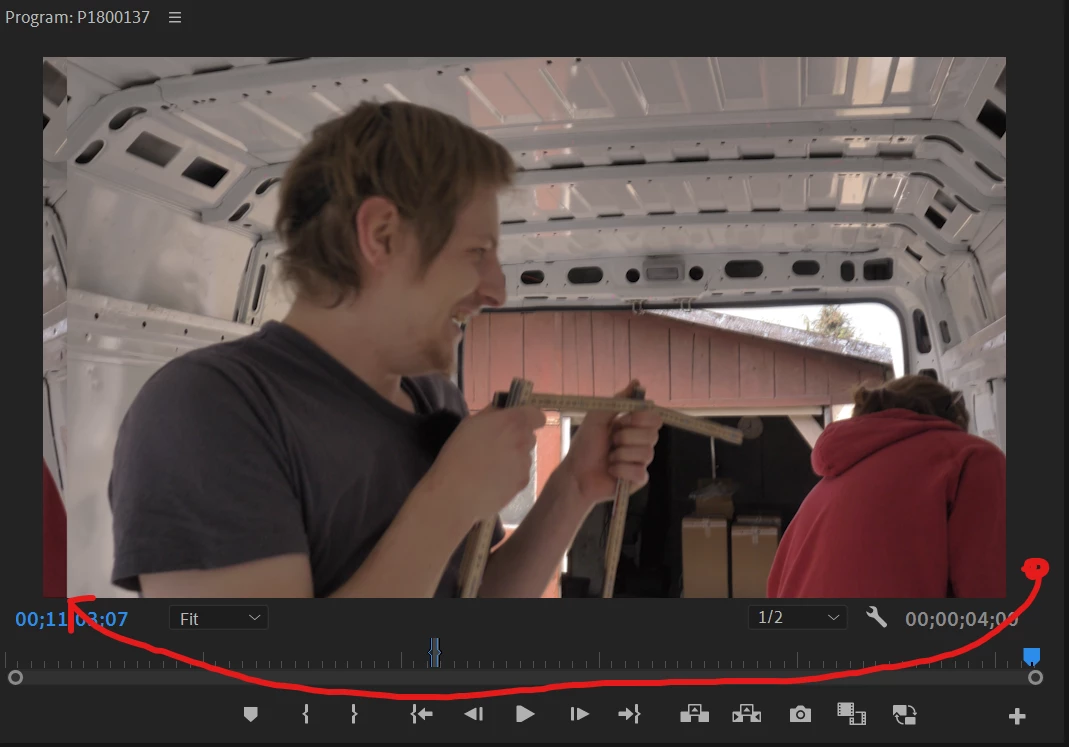
 

Anyone knows the solution to this issue?


Windows 11
Premiere Version 23.4.0 (build 56)

After Effects Version 23.5.0 (build 52)

Correct answer Thomas Yang

Hi @Ewa5EEF, sorry to hear you are experiencing this. This sounds like "Dynamic Link Compatibility Issue" as documented at https://helpx.adobe.com/premiere-pro/kb/known-issues.html. The resolution is to update both AE and PPro to 23.5 or above.


2 replies

Ewa5EEFAuthor
Participant
July 26, 2023

Thank you for the answer. I had to downgrade my Premiere to 23.4 because of the issues with performance, but your response pointed me in the right direction to solve my issue. For me downgrading also After Effects to 23.4 worked so I assume they should always be on an equal version.

Thomas Yang
Adobe Employee
Thomas YangCorrect answer
Adobe Employee
July 25, 2023

Hi @Ewa5EEF, sorry to hear you are experiencing this. This sounds like "Dynamic Link Compatibility Issue" as documented at https://helpx.adobe.com/premiere-pro/kb/known-issues.html. The resolution is to update both AE and PPro to 23.5 or above.