
after first clip imported, all others only post audio to timeline.
- March 9, 2021
- 1 reply
- 484 views
I am using MP4 files from my phone (same clips used to create videos on essentials with no problems). I import videos into my project bin and the first clip I post to my timeline works perfect every time, no matter what clip I use. I can cut it up, manipulate and edit it without issues.
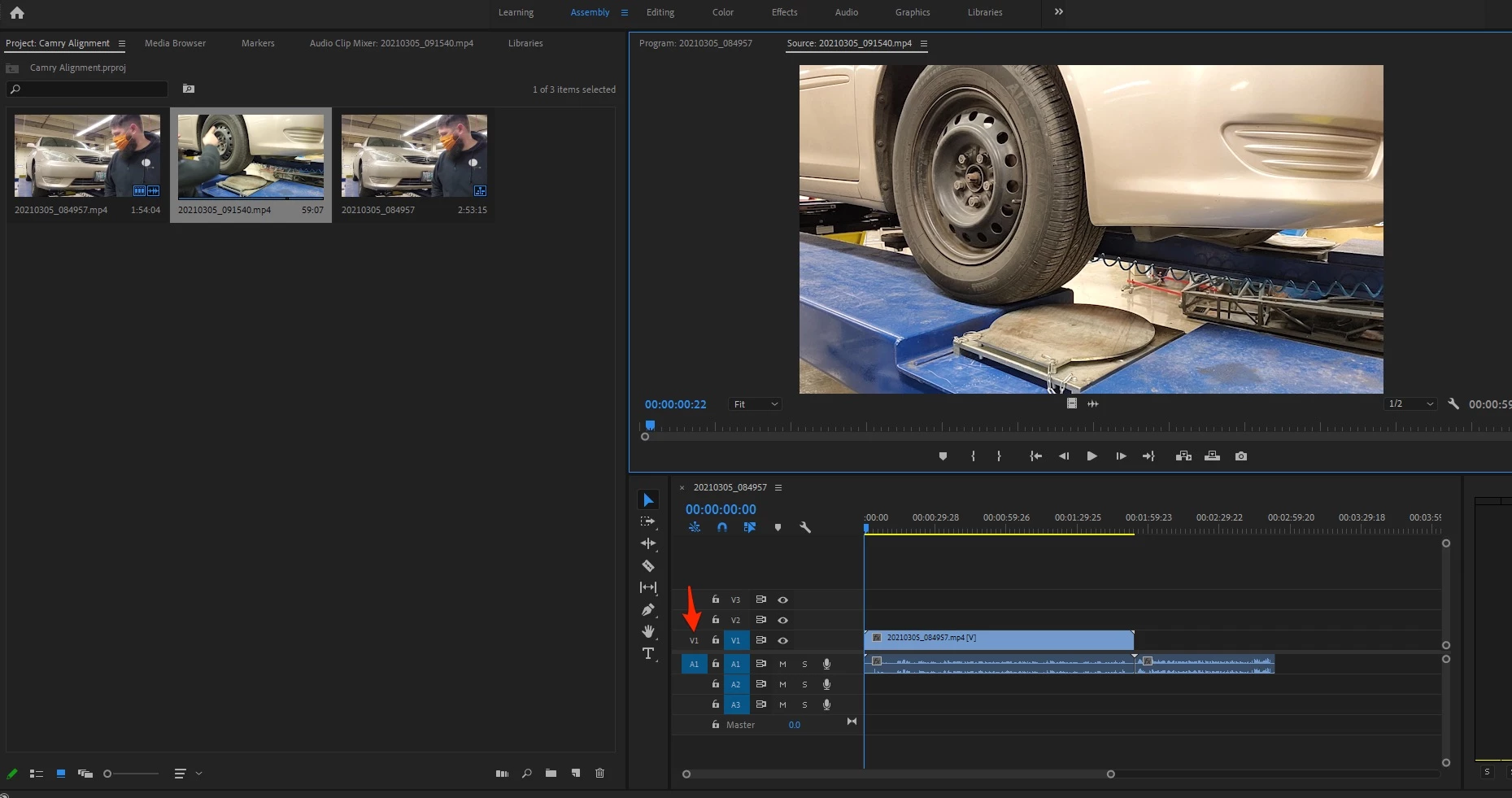
No matter what clip I use next, or where I import from (my external SSD or my desktop) the file will only import audio to the timeline. The video is in the project folder, and it will play through snapshots on the thumbnail. It will also play the video and audio no problem in the preview screen, but will not put the video in the timeline.
The attached picture shows the highlighted video in my project folder as audio only in my timeline, but its the same clip that is in the preview screen above with video.
Im double at a loss being as new to this as I am because I am not exactly sure how to articulate in a search the problem and also being new to all of the nomenclature making my searches much more difficult too. I appreciate any help in advance!
 AdChoices