


drewr40572560
Participant
February 28, 2018
Answered

All clips move over when speed is changed. It's causing timeline to be out of sync with video. Please help.

So today just randomly out of nowhere my timeline now has decided that whenever I change the speed and duration of a clip it will move all the clips ahead of it to counter the new speed. Which then make all the rest of the clip out of sync. I am currently editing a music video for my job, but this is really taking a toll on my work. It wasn't doing this about an hour ago, and I'm fairly sure I haven't hit any keys to cause this. Maybe I'm just being totally stupid and have caused such an easy fix but I cannot find anything on this matter online. If anyone could please, please help me I will be your best friend forever. Well, maybe not forever, but I'll be very happy. Please and Thank you. ~ Drew

Vishu_Aggarwal
Vishu_AggarwalCorrect answer
Participating Frequently
February 28, 2018

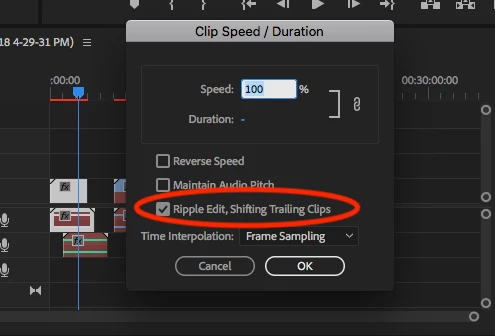
I think you have checked/Enabled - Ripple Edit, Shifting Trailing Clips in Clip Speed / Duration window. Uncheck the option so that  Trailing Clips does not shift as the duration changes.

screenshot for reference -

Vishu AggarwalAdobe Certified Instructor, Professional and Expert

3 replies

Legend
February 28, 2018

it will move all the clips ahead of it

The above Ripple setting will change the behavior of trailing clips (to the right), but I can't think of anything in PP that would shift the clips ahead (to the left) of the one you're adjusting.  Premiere Pro just isn't designed to work like that.

Translate
Vishu_Aggarwal
Vishu_AggarwalCorrect answer
Participating Frequently
February 28, 2018

I think you have checked/Enabled - Ripple Edit, Shifting Trailing Clips in Clip Speed / Duration window. Uncheck the option so that  Trailing Clips does not shift as the duration changes.

screenshot for reference -

Translate
Vishu AggarwalAdobe Certified Instructor, Professional and Expert
Participant
March 21, 2025

Thanks, it worked. I almost gave up! lol

Translate