

Producer storyteller
Inspiring
January 24, 2023
Question

All mogrt crashing premiere

  • January 24, 2023
  • 6 replies
  • 2992 views

Hello:

Any mogrt in the essentials graphics panel is crashing Premiere. Even VERY basic ones I have made in AE. No matter where the mogrt comes form, the ones that come with Premiere or ones I have bought from third party or, again, ones I have made with only the basics in After Effects, will freeze and crash Premiere Pro. Yes, I am importing the mogrt via the essential graphics window. What I have tried:

  1. Uninstalled Adobe everything various times
  2. Cleared every cash imaginable 
  3. Uninstalled plugins I have purchased. 


My system specs:
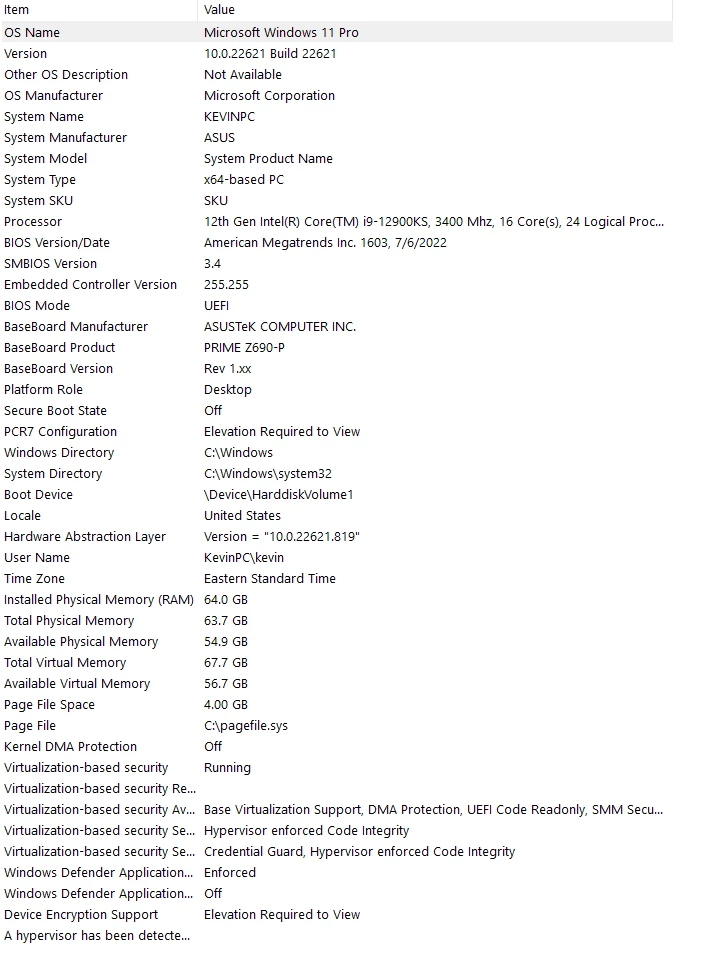
 

THIS IS A HUGE PROBLEM, as like most of us, I am on a deadline and need these to work. Any help would be great.

Thanks,

Kevin


6 replies

tonyh42699688
Participant
October 7, 2025

A couple of years down the line, but did this ever get solved? I'm having exactly the same issue.

Participating Frequently
February 18, 2025

I have similar problem on Mac's Silicone based processors. The issue is nearly identical. Drag to the timeline and app crashes. 
I do also have problems withs After Effect's template files. 
I tried to use them in my intel based mac and they worked just fine.
The apps used to have a feature allow you to open them in a special format that runs in theirs Intel based format called "Rosetta Mode', Unfortunately Adobe removed that feature in their recent versions. And not allow ou to donwload those versions.
Theis native apps is the culprit. Recent significant projects that I had been involved in requires huge amount of graphic work and of course MOGRTs. Havingmore than onw computer is not ideal for me as the other ones not as fast as the main machine. Found some good templates for Davinci and Final Cut so until they find a solution for this, I think I am switching. 

Soulancipation
Known Participant
August 19, 2024

I have seen exactly the same problem, and I have posted a separate bug report with essentially the same details.

Soulancipation
Known Participant
August 19, 2024

I can reproduce this problem with ANY MOGRT in the file. I created an empty file with only 1 sequence, and the only thing in the sequence was the MOGRT file. Doesn't matter which one I choose, the app crashes when I try to render out.
You can see the details of my report here: https://community.adobe.com/t5/premiere-pro-bugs/projects-containing-mogrts-no-longer-render/idi-p/14809699 

jstrawn
Legend
February 6, 2023

Since you already tried the usualy things like clearing cache and using the cleaner tool, I have just a couple of toher ideas to try:
(1) Can you apply a Pr mogrt, instead of an Ae mogrt to see if the same things happens. There are many Pr mogrts installed with Pr by default and they have neames like what you see in the screenshot.

(2) In PrPro, go to File > Project Settings > Scratch Disks... and change the "Motion Graphics Template Media" folder so someplace else, like in a custom-named folder on your desktop?

Producer storyteller
Inspiring
February 10, 2023

Same thing is still happening with the premiere mogert.


Tried something new and this might help, I opened up a brand new project and put a bunch of video on the timeline and imported all kinds of mogrts and they work Premier did not freeze. Went back to the project I was working on and tried to import all kinds of mogrts and premiere crashed. Cash has been cleared.


Thoughts?

R Neil Haugen
Legend
February 10, 2023

Something in that project file might be corrupted.


Try creating a new project, then from the Media Browser panel in that project, select the old project file and import the sequences from it. Probably one sequence at a time.


Check that it's working normal, then bring in another sequence. As it might be either be a sequence data issue or project data.


Neil

Everyone's mileage always varies ...
jstrawn
Legend
February 3, 2023

Can you use the private message feature to send me one of those very simple Ae mogrts that are crashing for you? You might have to zip it up in order to attach it.

R Neil Haugen
Legend
February 3, 2023

Thanks, James!

Everyone's mileage always varies ...
R Neil Haugen
Legend
January 24, 2023

Wow! That's ... awful. And as puzzling ...


Have you tried uninstalling with the Adobe CC Cleaner tool? That gets out a lot of stuff in the Registry and other places a typical uninstall doesn't.


And ... @jstrawn  and @DaciaSaenz  ... any help maybe? Ideas?


Neil

Everyone's mileage always varies ...