
Participant
March 19, 2024
Answered

already used video - setting

  • March 19, 2024
  • 1 reply
  • 351 views

hello everyone!
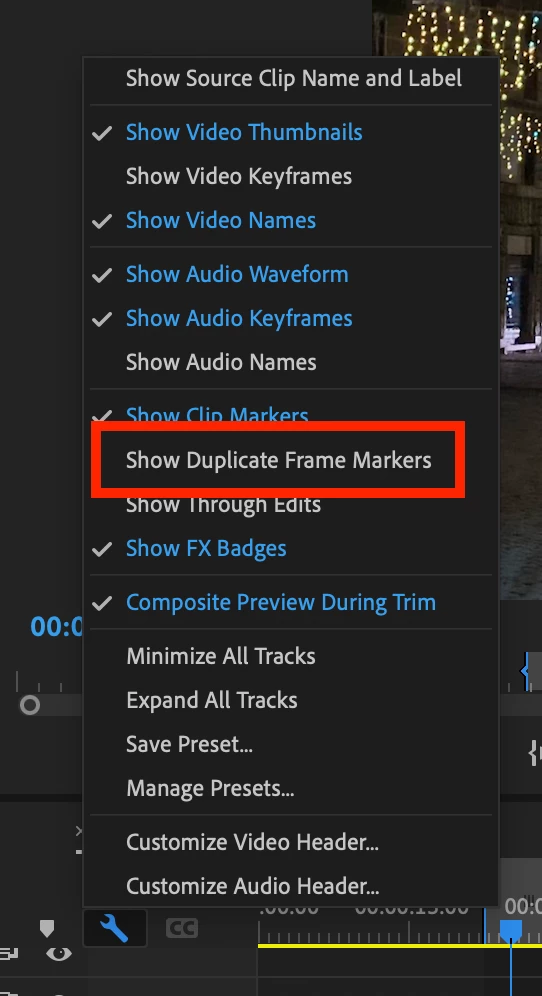
I know that it is possible to see that some audio or video is used twice or more in a sequence. I have that setting on my computer at work but not at home, which is very irritading to be honest - its a very useful feature.
So to cut it short: where can i find that setting? I already tried to use that meta-thing but then I can only see it in my project window, not on my sequence.


thanks a lot in advance to anyone for helping and kind regards from Italy!
This topic has been closed for replies.
Correct answer Kevin J. Monahan Jr.

Oh, do you want duplicate detection on, @Karina Reiner? Check out the Timeline Display Settings menu (wrench). Hope that helps.


Thanks,
Kevin

1 reply

Kevin J. Monahan Jr.
Kevin J. Monahan Jr.Correct answer
Legend
March 19, 2024

Oh, do you want duplicate detection on, @Karina Reiner? Check out the Timeline Display Settings menu (wrench). Hope that helps.


Thanks,
Kevin

Kevin Monahan - Sr. Community and Engagement Strategist – Adobe Pro Video and Audio
Participant
March 19, 2024

omg thank you!!

Kevin J. Monahan Jr.
Legend
March 19, 2024

Got it. Thanks @Peru Bob.


In Icon View, you can also click on the icons in the lower right corner of the clip to see usage and location in a sequence. Roll over to see the number of uses.


Thanks,
Kevin

Kevin Monahan - Sr. Community and Engagement Strategist – Adobe Pro Video and Audio