Answered
alt+ left click
everyone knows alt+left click u can select only 1 link/group stuff
but somehow it just reverse ?
when i left click (without alt+)it turns up that i only select only 1 sutff in link/group
how do i turn it back ?

everyone knows alt+left click u can select only 1 link/group stuff
but somehow it just reverse ?
when i left click (without alt+)it turns up that i only select only 1 sutff in link/group
how do i turn it back ?
@金正29933309w93o You have likely turned off Linked Selection in your timeline. Alt+left click is aware of whether Linked Selection is on or off, and performs the inverse.
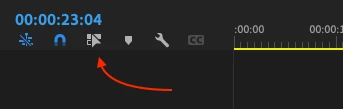
Turning it back on should fix your issue.
Already have an account? Login
Enter your E-mail address. We'll send you an e-mail with instructions to reset your password.
 AdChoices