



Todd_Morgan
Legend
March 19, 2026
Question

animating track mask not working

  • March 19, 2026
  • 3 replies
  • 51 views

Just updated PR and the new masking scenario is confusing - I am unable to animate keyframe track mask. I start one first keyframe, draw my mask, next keyframe I move points, but then go back to previous keyframe and my initial position is gone and the shape of the second keyframe what’s there. How do I get my old way back where I can keyframe masks quick??


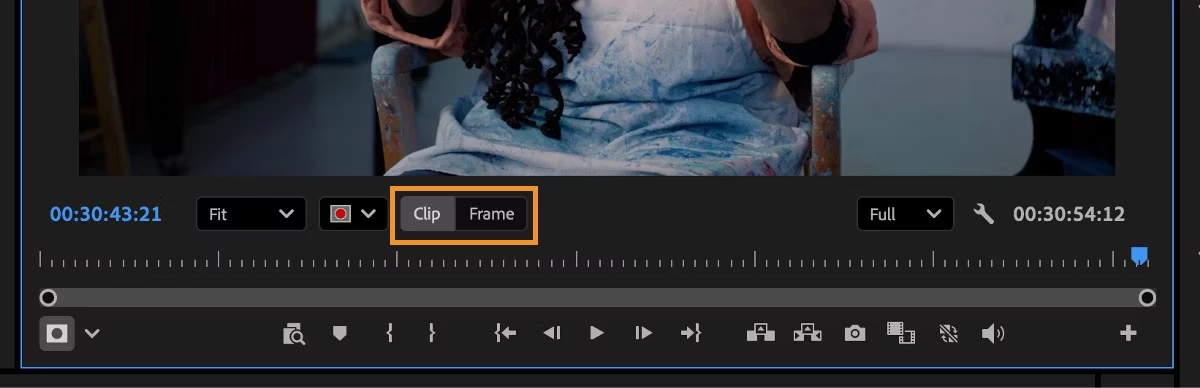
I am also missing these buttons 
 

    3 replies

    Todd_Morgan
    Legend
    March 23, 2026

    Thanks everyone - I have done the reading and got it figured out, sorry for all the whining!!

    Ann Bens
    Community Expert
    Community Expert
    March 19, 2026

    As soon as you draw a rectangle/ellipse or use the pentool the Clip/Frame button will appear

    R Neil Haugen
    Legend
    March 19, 2026

    When you hover over the Toolbar mask icon, there's a pop up that links to their documentation. You MUST read that to get full use of it.

    Everyone's mileage always varies ...
    Todd_Morgan
    Legend
    March 19, 2026

    What I can’t find is where the CLIP/FRAME button exists because there is not one on my program pane as per above.

    R Neil Haugen
    Legend
    March 19, 2026

    Give the precise steps you go through before it doesn’t appear ... 

    Everyone's mileage always varies ...