
Known Participant
May 22, 2020
Question

Any more buttons in the button editor? (Avid user here)

  • May 22, 2020
  • 1 reply
  • 930 views

Hi all,

I'm trying to customise my panels and get comfy with Premiere.

I've opened up the button editor and am pretty disappointed with the amount of buttons available. Is this it?! (source monitor for example)
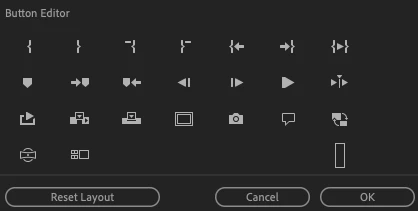
1. Are there a hidden option somewhere to open up a ton of others?

2. Any more tools for the toolbar?

3. Where do I find my saved settings? For instance, if I want to take them to another computer? And what is saved within these? (e.g. Avid User Settings equivalent)

thanks

This topic has been closed for replies.

1 reply

Ann Bens
Community Expert
Community Expert
May 22, 2020

1. what buttons do you think are missing?

2. nope. Many tools use either shift or ctrl or both. Or use kbsc.

3. You can save your settings in the cloud. See preferences/sync settings.


14.2. button editor program window:

Known Participant
May 22, 2020

1. good question! I'm just used to having lots of tools at my disposal. I can think of a few - match frame back to source clip, find folder of source clip, adding locators of different colours, forward and back 10 frames, not to mention on the record side - extend edit, split edit, lots of stuff. But I suppose in Premiere these are all shortcuts on the keyboard?

2. Sure. I thought so.

3. And can I use my personal Adobe profile to sync with every time I jump on a shared machine? I've tried it already and it seems ok to me.

4. (additional) where would I find my settings if I wanted to carry them around with me on a key, in case I don't have access to the internet somewhere?

Ann Bens
Community Expert
Community Expert
May 22, 2020

4. I have no idea, dont know if that is even possible.