Answered
Apparition d'une image
Bonjour, j'aimerais savoir comment faire pour faire apparaître progressivement une image par dessus une vidéo.
Merci.

Bonjour, j'aimerais savoir comment faire pour faire apparaître progressivement une image par dessus une vidéo.
Merci.
That would be set in the Effects Control Panel (ECP) by placing keyframes for Opacity changes. As shown below ...
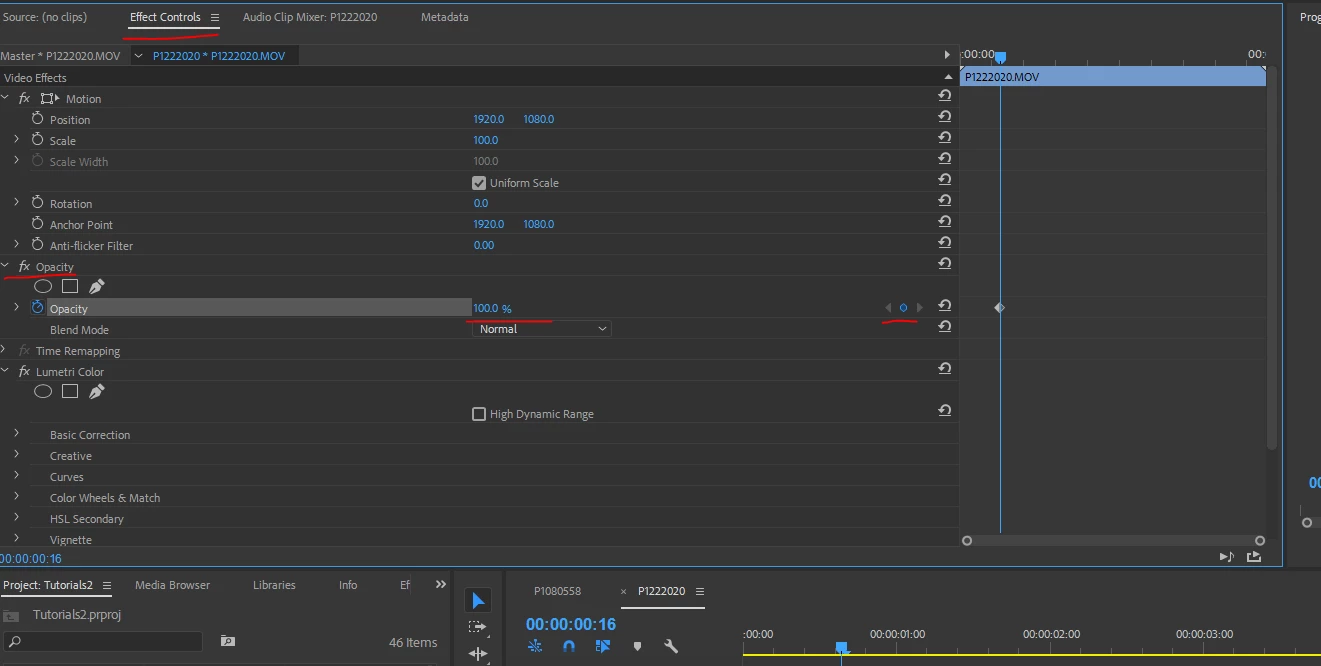
Note the red highlights ... Effects Control panel, Opacity section, set keyframe with the diamond to the far right, set the opacity as a percentage (0 is black) ... place another keyframe later by clicking the diamond again, adjust percentage of opacity to taste.
The ECP is where you animate nearly everything from presets, motion, effects, text, most everything.
Neil
Already have an account? Login
Enter your E-mail address. We'll send you an e-mail with instructions to reset your password.
 AdChoices