Participant
September 11, 2020
Answered

Apple Pro res .mov files will no longer load on my timeline.

  • September 11, 2020
  • 2 replies
  • 374 views

Since the last update I can no longer load Apple Pro res specifically 422hq mov file to my timeline. I can still view them in library and source viewer but as soon as I drag them to timeline I can't drop them in. I checked previous projects and the Apple pro res have vanished.

Any help would be appreciated.
This topic has been closed for replies.
Correct answer R Neil Haugen

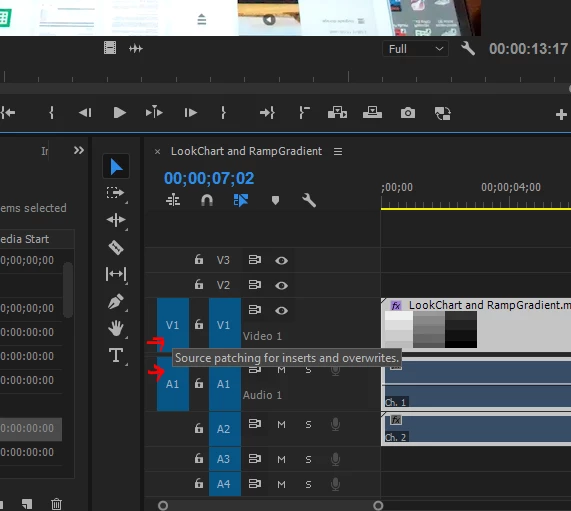
I'll add ... quite often when things don't drop onto a sequence in a timeline panel, it's because the Source targets aren't set ... those are the left two blue blocks in my example here.


Neil


2 replies

Participant
September 12, 2020

Neil, You were correct! I checked the source targets and its working now. I feel stupid, never have had that issue.


Thank you

Pete

R Neil Haugen
Legend
September 12, 2020

Hey, do this long enough, this sort of thing happens. Dang embarrassing but it happens to everyone. Some silly little thing we don't notice ... sigh.


Neil

Everyone's mileage always varies ...
R Neil Haugen
Legend
September 11, 2020

Drag/drop a few screen-grabs of your sequence especially showing the left-end 'header block' controls onto your reply box. They'll appear in your post and help us figure out what's going on.


I work with a lot of ProRes in all formats including HQ and not having any issues on my Win10 machine.


Neil

Everyone's mileage always varies ...
R Neil Haugen
R Neil HaugenCorrect answer
Legend
September 11, 2020

I'll add ... quite often when things don't drop onto a sequence in a timeline panel, it's because the Source targets aren't set ... those are the left two blue blocks in my example here.


Neil


Everyone's mileage always varies ...