
Participant
October 23, 2019
Question

Apply Video Transition only to one track which represents a small portion of the screen

  • October 23, 2019
  • 2 replies
  • 1832 views

Hello Everyone,

As represented in the picture below, i have 2 tracks (V1 and V3). V1 (Purple) represents the background, while V3 (Pink) represents a portion of the screen on top of V3. The track V3 is composed of a series of clips (transparent .png pictures), and the transitions between those clips are of the type "Dip to Black". The problem is that the transition affects the entire screen (the pink area and the  purple area which is the background), dipping V3 also to black. I want the transition to only affect the pink area.
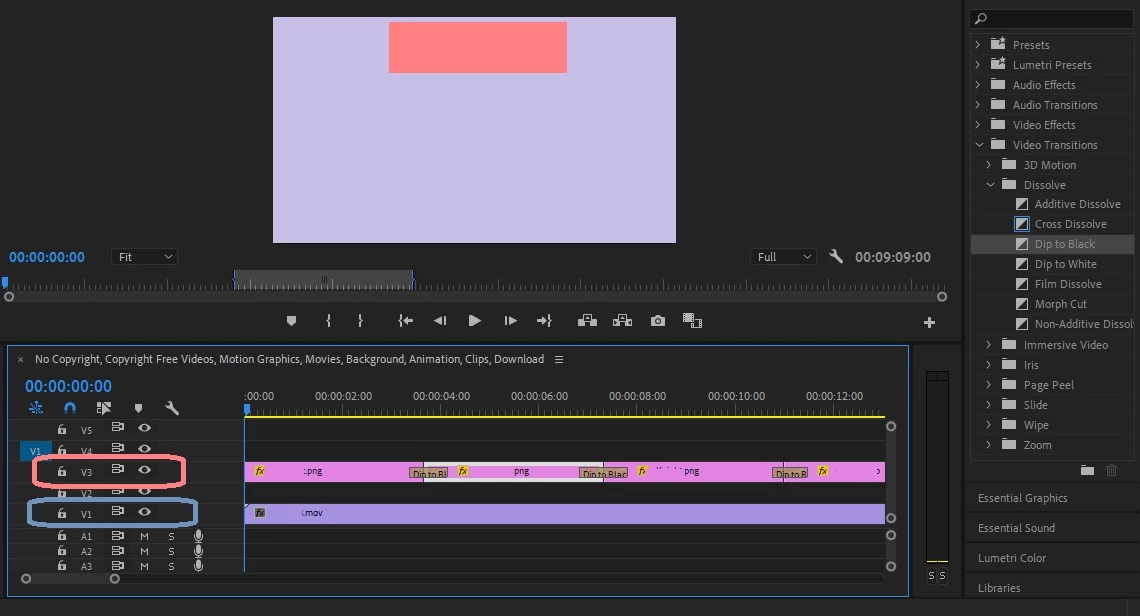

Thank you.

This topic has been closed for replies.

2 replies

Inspiring
October 23, 2019

If I understand correctly you want the pink areas to go black not fade off? Assuming all the PNGs are the same size you could create another PNG in the same size and make it black. Drop it on the length of V2 and change all your V3 PNGs 'dip to blacks' to a dissolve in and out of each clip (not cross dissolves). That would achieve the above. Won't of course work if your PNGs are different sizes.

Peru Bob
Community Expert
Community Expert
October 23, 2019

Don't use Dip to Black.

Use a cross disolve to black video.