


Inspiring
December 9, 2025
Answered

Are you going to correct the stabilization errors?

  • December 9, 2025
  • 2 replies
  • 232 views

This error occurs in every version. I don't need AI, I need stabilization. Normal stabilization. A standard tool in video editing. Can I get it from Adobe?  What do I need to do this? I know about drivers, updates, and resetting settings. Any other options?
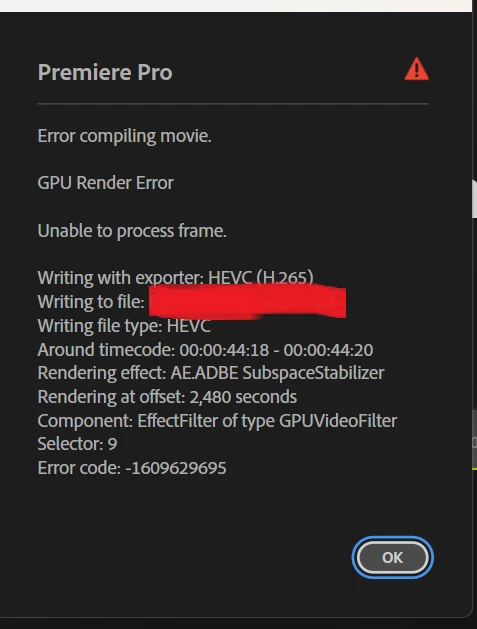

 

868609i03604352EA9EFFD2.png

Correct answer Victor5CD3

I've experienced this error before. One way I worked around it was to edit the take that needs stabilization separately, then simply replace the take in the project using "replace media" in a large project timeline. This error usually occurs.

2 replies

Victor5CD3
Victor5CD3Correct answer
Inspiring
December 9, 2025

I've experienced this error before. One way I worked around it was to edit the take that needs stabilization separately, then simply replace the take in the project using "replace media" in a large project timeline. This error usually occurs.

Build CPU Ryzen 5700X,64 GB ram,Nvidia geforce 5060 Ti 16 Gb,SSD nvme 1tb + ssd sata 2Tb HD Disc 2Tb Win11 24h2
Kevin J. Monahan Jr.
Legend
December 9, 2025

Hi,

Thanks for the reply. When you are stabilizing shots that are not only HEVC, but 4K and beyond in a big timeline with other GPU accelerated effects happening, you can run short on resources. That's probably why render and replace is solidifying your workflow. I hope that a team member or a community member might offer more info to help you. Sorry for the hassle on this.


Thanks,
Kevin


Kevin Monahan - Sr. Community and Engagement Strategist – Adobe Pro Video and Audio
Kevin J. Monahan Jr.
Legend
December 9, 2025

Hi,

I saw your post. Thanks for the screenshot. Can the team get a bit more info? See: How to Report a Problem


Please fill in details about your system and media so we can help you.


Thanks,
Kevin


Kevin Monahan - Sr. Community and Engagement Strategist – Adobe Pro Video and Audio