

SC-Agency
Inspiring
November 23, 2019
Question

Artifacts for text in videos at H.264

  • November 23, 2019
  • 1 reply
  • 966 views

I animated some text (PNGs from Photoshop) in Premiere. All my attempts at H.264 output show horrible artifacts and jagged lines around the lettering. See a screenshot below.
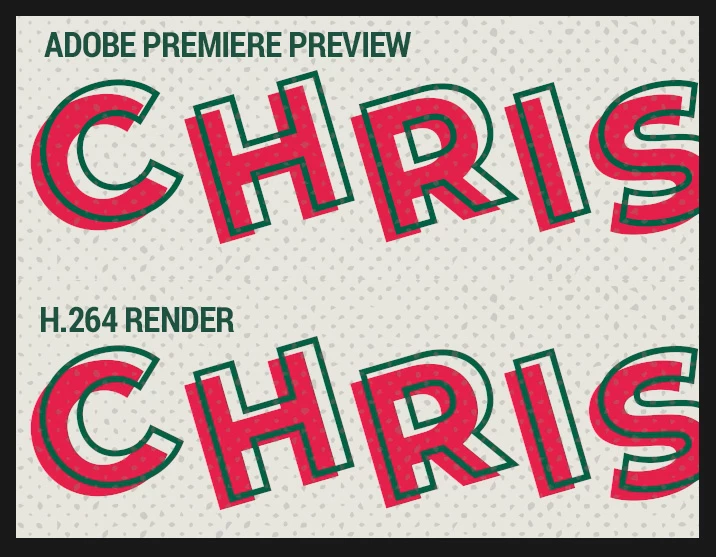


My source is 1920x1080 graphics. I use Matt Johnson's 1080p H.264 output preset, pretty solid:

  • Video 1920x1080, Square Pixels, High Profile, 4.2 Level
  • Tried with/without Rendering at Maximum Depth
  • VBR2 Pass, Target 15, Max Bitrate 40
  • Tried with/without Use Maximum Render Quality


Is there anything that will make these text lines cleaner?


UPDATE: Odd, on another monitor the jagged lines are far less apparent. Is this a monitor color issue and not an encoding issue? What's weird is the newer, better monitor with wider color gamut it looks bad. Driving me nuts!


Thanks!


This topic has been closed for replies.

1 reply

CSI Productions
Inspiring
September 7, 2023

I'm having a similar problem with Premiere Ver.23.6.0 except I'm also seeing small artifacts around the font Lora Bold (Downloaded from the Adobe site). These appear in both the Premiere video editing interface as well as the render. Anyone know what's causing this one?


OS:

Ventura 13.0.1


Graphics Card:

AMD Radeon Pro 5700 XT 16GB


RAM:

64GB


Proc:

3.8 GHz 8-Core Intel Core i7

R.CatesCSI ProductionsIf you want peace, be peaceful.
CSI Productions
Inspiring
September 7, 2023

Answered my own question. Reading another text artifact comment, it dawned on me that I added a very subtle VR Glow effect to help separate the type from lighter areas in the background. VR Glow (in fact both glow effects) are causing these artifacts. I will make a feature request but seriously, what's the point of having a glow that's litterally so bad it's un usable? Why can Photoshop create a very nice soft glow around text and objects but we can't get that same quality in Premiere?

R.CatesCSI ProductionsIf you want peace, be peaceful.