
Question
Artifacts on Miraizon ProRes 4444 files with alpha channels
Hi all,
I've run into severe artifacting when using some videos with an alpha channel that are encoded as Miraizon ProRes 4444 (not a codec I would choose myself but it seems popular in certain stock graphic libraries). Sorry, I know it's probably a very niche issue but it's been a wrinkle in our workflow recently.
Issue: Large, black, blocky artifacts on playback.
Premiere Pro Version: 23.3.0 (I also tested it on the 23.5.0 beta and the issue was present there as well - but I went back and confirmed that these files playback fine in 22.5.0).
Operating system: Windows 11 (22H2, 22621.1702)
System Info:
- AMD Ryzen Threadripper 3970X 32-Core 3.69 ghz
- AMD 6900 XT (Driver 23.4.3 - also tested on 23.4.2)
- 128 GB RAM
Additional info:
- Collaborators working in the same version of Premiere on Apple M1 machines haven't been running into this issue with the same footage.
- Re-transcoding to normal ProRes 4444 using Media Encoder just bakes in the artifacting.
- Initially the artifacts didn't appear when the video was paused and only appeared after pressing play (both in the source monitor and the program monitor).
- Switching the renderer to "Software Only" did not fix the issue.
- Unchecking "Composite in Linear Color" didn ot fix the issue. Interestingly after re-checking this the artifacts started appearing when the video was paused as well, which wasn't the case before.
- These artifacts also appear in the corresponding version of After Effects.
- These artifacts don't appear in any non-Adobe software - it plays fine in Resolve and in the end my workaround is just to re-transcode using Shutter Encoder.
Example of artifacting:
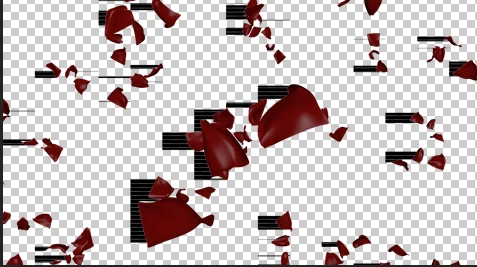
vs
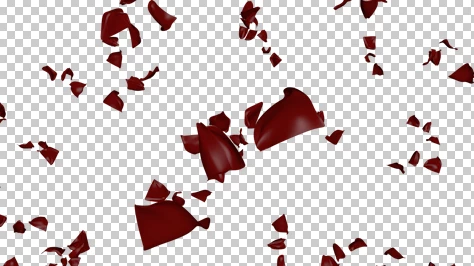


 AdChoices