
Medconsulting
Participant
January 23, 2025
Question

As of PP 25.1 and PP beta 25.0 I get a debug error (without consequences) and cannot file error

  • January 23, 2025
  • 3 replies
  • 350 views
  • first Issue

On starting of the latest versions of PP I get a debug error window without any apparent consequences after ignoring.
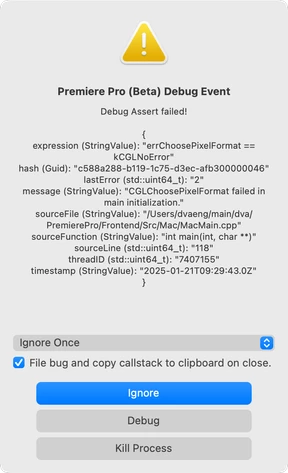
(possibly related to the external Batch Analysis for Warp Stabilization v1.7.3)


  • Adobe Premiere Pro version number: PP 25.1.0 Build 73 and PP beta 25.0.0 Build 89 (and the two or three previous)
  • Operating system: macOS Sequoia 15.1.1 (German)
  • System Info:
    • 3.2 GHz 6-Core Intel Core i7

    • Intel UHD Graphics 630 1536 MB and eGPU BlackMagic Radeon Pro 580

    • RAM: 32 GB 2667 MHz DDR4

    • Hard Drive: APPLE SSD AP1024M Media.

  • Video format: not relevant - happens before any open window
  • Workflow details: on starting the application, before window is opened.
  • Steps to reproduce: everytime on starting the application, before window is opened. 
  • Expected result: no error.
  • Actual result see abobe (issue).


Second issue:

bug filing fails with
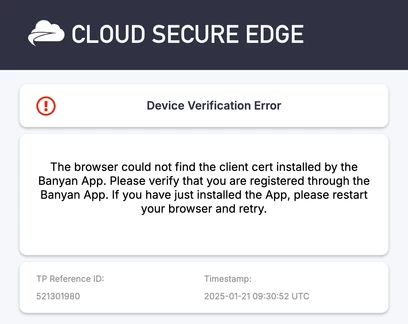
on "ignore" with file box ticked. I cannot download the Banyan App, I'm in no business relation with Banyan.

All else see first issue.

3 replies

Stan Jones
Community Expert
Community Expert
January 24, 2025

@Medconsulting,


Try holding shift down as you launch. In the popup, disable plugins. I suspect the Batch Analysis for Warp Stabilizer has some issue. On the Exchange, it does not appear to have been updated since last April:

https://exchange.adobe.com/apps/cc/107996/batch-stabilization-analysis-for-warp-stabilizer


Either way, I'd also contact their support.


Stan


Medconsulting
Participant
January 23, 2025

If  'in the past' is before PP 25.1.0 Build 73 and PP beta 25.0.0 Build 89 (and the two or three previous) then NO.

I have no more details to share, sorry.

If Adobe uses Banyan services, then it is Adobe related. Anyway, the error cannot be filed, which is not really my concern, I'm not the developer, I'm just trying to be helpful.

Regards,

Andreas

Kevin-Monahan
Community Manager
Community Manager
January 24, 2025

OK, thank you for the additional information. I hope a developer will comment here shortly. Sorry for the frustration.


Thanks,
Kevin


Kevin Monahan - Sr. Community & Engagement Strategist – Pro Video and Audio
Kevin-Monahan
Community Manager
Community Manager
January 23, 2025

Hello @Medconsulting,
Welcome to the forum. Thanks for the post. I’m Kevin, from support and I'm a moderator here. Thanks for all the information you provided.
 
Has this issue been a problem in the past while performing the same action with that effect? Are there any other details you can give us? I hope we can help you soon. Sorry for the problem.

I'm not aware of your second problem. How did you get that error? I don't think it's Adobe related.
 
Thanks,


Kevin


Kevin Monahan - Sr. Community & Engagement Strategist – Pro Video and Audio