
Participating Frequently
January 31, 2021
Answered

Aspect ratio issue

  • January 31, 2021
  • 4 replies
  • 1832 views

Hello community,

I'm brand new to Premiere pro and I'm having an issue with aspect ratio.  I've imported an SD video from a tv show into the program, 720x480 4:3, but it's stretching the video's aspect ratio and the picture is coming out looking like I tried converting it to a wider format.  When I go to sequence settings it's saying that the video is in 720x480 3:2.  I'll attach a pic of the settings.  How can I keep the proper 4:3 fullscreen when I export the file?


Thank you for your help.  
This topic has been closed for replies.
Correct answer Michael L at UNCP

I think Richard M. Knight is on to something with the pixel aspect ratio but I would try going at it from a diffent angle.

I don't think your sequence is the issue. I think Premiere is misunderstanding your footage. I've had similar issues before. Leave your pixel aspect ratio whatever you want in the sequence.


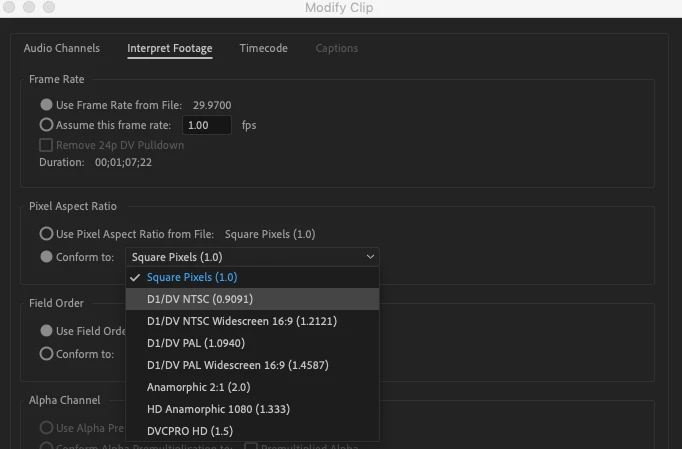
Right click on your footage in the Project panel and click Modify then Interpret footage...

Once there, change the pixel aspect ratio to Conform to: .9091

4 replies

Participating Frequently
February 2, 2021

Thank you Richard, Ann, John, and Michael for all of your help!  It's so amazing to have a community like this that springs to action when someone needs help.  You're amazing!!!

Michael L at UNCP
Michael L at UNCPCorrect answer
Inspiring
February 1, 2021

I think Richard M. Knight is on to something with the pixel aspect ratio but I would try going at it from a diffent angle.

I don't think your sequence is the issue. I think Premiere is misunderstanding your footage. I've had similar issues before. Leave your pixel aspect ratio whatever you want in the sequence.


Right click on your footage in the Project panel and click Modify then Interpret footage...

Once there, change the pixel aspect ratio to Conform to: .9091

Participating Frequently
February 2, 2021

Michael, you're a lifesaver!!!!  That did the trick.  Thank you so very much for your input.  I truly appreciate it!


Community Expert
January 31, 2021

720x480 is 3:2  not 4:3 using square pixels. Try changing the 'Pixel Aspect Ratio' from Square Pixels to something like this:


Participating Frequently
February 1, 2021

Thank you very much Richard.  I changed that setting, however, the picture is still importing and exporting askew.  I have attached a comparison so that you can see what's happening.  It almost looks like Adobe is compressing the footage's height.  I'm not sure why this is happening.  I've run other videos in the same aspect ratio and they turned out perfectly.  Granted they were HD and not SD, but I fail to see how that would make any difference.  Would you know why this is happening?


Thank you for your help.

Mark

.