andrewb62924978
Participant
November 20, 2023
Question

Audio A1 track plays but not others

  • November 20, 2023
  • 2 replies
  • 756 views

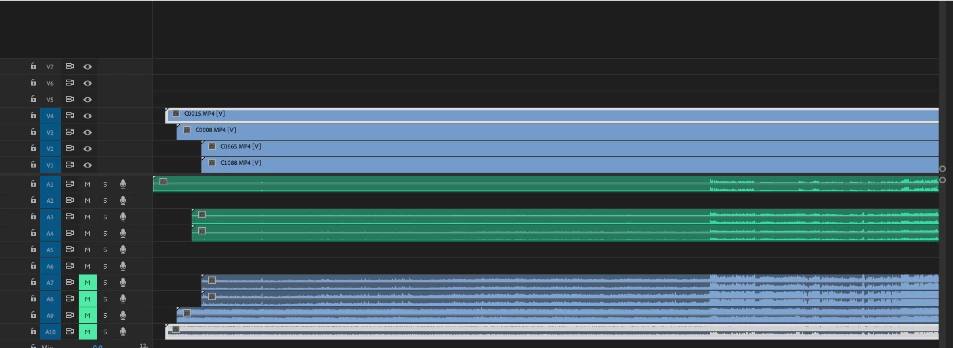
In my timeline. The recorder file on A1 plays but A2-A4 do not. A7-A8 from camera do play. All tracks have sound and if I move the track from A2 to A1 it plays. What is going on?

This topic has been closed for replies.

2 replies

Warren Heaton
Community Expert
Community Expert
November 20, 2023

In your screen shot, the lower tracks have been muted.  Enabling the Mute option tells Premiere Pro to not play the corresponding Audio Track.

Peru Bob
Community Expert
Community Expert
November 20, 2023

@Warren Heaton10841144 

Only A7-A10 are muted in the screenshot.

andrewb62924978
Participant
November 20, 2023

Those tracks are supposed to be muted. Tracks A2-A6 are not playing and they should be. A1 is playing. A7-A10 will play if not muted. There is my delima. Why can't I hear A2-A6?


Peru Bob
Community Expert
Community Expert
November 20, 2023

Try Sequence > Render audio from the menu at the top.


If that doesn't work, delete the Media Cache and Media Cache files:
https://community.adobe.com/t5/premiere-pro/faq-how-to-clear-your-media-cache-in-30-seconds-in-premiere-pro-2020/m-p/11017257/thread-id/260446?page=1

If that doesn't work, try resetting the preferences:
https://community.adobe.com/t5/premiere-pro/faq-how-to-reset-trash-preferences-in-premiere-pro/td-p/8236158?page=1

If that doesn't work, try resetting the Workspaces:
Reset a workspace
Reset the current workspace to return to its original, saved layout of panels.
1. Do one of the following:
• Click the Workspace menu icon and select Reset to Saved Layout.
• Choose Window > Workspace > Reset to Saved Layout.
from here:
https://helpx.adobe.com/premiere-pro/using/workspaces.html

If that doesn't work, try Preferences > Audio Hardware and set Input to None.

If that doesn't work, try creating a new project and import the old one into it.