
lucindah51521249
Participant
June 23, 2015
Answered

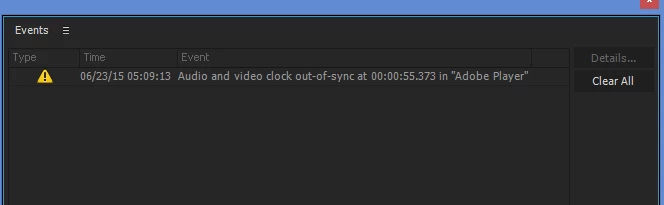
Audio and Video clock out-of-sync at 00:00 in "Adobe Player"

  • June 23, 2015
  • 14 replies
  • 38017 views

No problems with Adobe Premiere Pro 2014 - then I upgraded to 2015. Now my first file/project getting this error when I play my video in the project player. (screenshot included)

Video jumps back and forward, the error window pops up. And audio of course breaks in and out. I tried starting with a new project. Dropped a plain piece of video into the project which had NO audio - still get the error and jumpy playback.

Of course, I wish I had not upgraded but it's too late now. And for the first time the upgrade process REMOVED my 2014 version - this really sucks for my production schedule

Help - please!!

How Do I Fix this?

How Do I get CC 2014 Back!!
    This topic has been closed for replies.
    Correct answer Mitch W

    Hi All,

    There have been a few successful workarounds for this problem. You can:

         * Disable the input device listed in Default input through Device Manager (so that the default input device is "No Device Available").

         * Change the input device to something like Line in or Mic in and then plug a device into that input (even a set of headphones will generally work for this)

         * Or, install Asio4All to provide an alternative to the MME driver listed under Device Class.

    All of these options have been successfully used to resolve this issue. The Premiere Pro engineering team is aware of and is actively working to resolve this issue. Hopefully they'll have something soon!

    14 replies

    Participant
    September 22, 2021

    Hell

    Participant
    April 5, 2020

    I know this is an old post, but I found it via Google for the issue at hand. I tried installing the ASIO4All file and it made no difference - before AND after, selecting ASIO instead of MME in the Audio Hardware just muted the sound.


    I found the answer by changing the default input from Digital-In to any of the other options I had set up. However, why this was happening, I've no idea. It was fine this morning, then just changed. At the same time, all my 'open recent' projects had cleared and I had to reopen them again so they showed up there. What a bizarre program.

    Participant
    January 26, 2016

    I'm on a Mac and experiencing this problem at a most unfortunate time. And FWIW, I'm on PP 9.0.0 (247) build and can't seem to get any higher. I just uninstalled and reinstalled and this is what I get with no available option for newer builds.  I would greatly appreciate any help available.  Thanks.  Duane Abler

    Participant
    January 26, 2016

    Just got help from Tech Support with an online chat and have installed 9.1 so hopefully this issue is resolved for me.

    rvibe1
    Participant
    September 20, 2015

    I have the same problems AND I have 9.02. Thought the issues were to be fixed in 9.01.

    On a trial. Worked OK then went to crap.

    As someone said before, can we be more specific w troubleshooting.

    When someone says disable the input for audio are we talking about doing this through the PC or in Premiere.

    When someone talks about changing latency, where is this found.

    I am struggling to figure out how to use the program, anything else needs to be described assuming some people have only a basic knowledge of this stuff.

    Frustrating for sure this is supposed to be a phenomenal program.

    Asio by the way makes it worse. It plays back without hiccups but the audio did not match up with the video. Not good.

    As a trial user my only source for troubleshooting is here and no Chat...etc.

    Any new info or help??  Again, please explain in simplest and specific terms.

    Much appreciated.

    My question to adobe is if there are so many problems why roll it out. People say 2014 worked fine, how can I get this. I much rather go back to a previous version if it works right.

    Manoni
    Participant
    August 3, 2015

    Hi there,

    none of this seems to work with me. I'm an editor, not a computer tech so please use "sesamystreet language"(I'm Dutch native speaker so tech english is difficult... sorry).

    grtz manon

    Mitch W
    Participating Frequently
    August 3, 2015

    Manon,

    Did you install the 9.0.1 update to Premiere Pro?  Check for available updates by choosing the Help > Updates menu in Premiere Pro. You can also verify which version of Premiere Pro you are running by checking the build number in the "About Adobe Premiere Pro" screen. It should say 9.0.1 (36) build.

    Manoni
    Participant
    August 4, 2015

    Tnx people,

    Yes I had the update. What really helped was killing all my preferences.

    Tnx!

    Van: Vinay Dwivedi

    Verzonden: maandag 3 augustus 2015 19:54

    Aan: Bruyns, Manon

    Onderwerp: Reply marked as helpful on Audio and Video clock out-of-sync at 00:00 in "Adobe Player"

    Audio and Video clock out-of-sync at 00:00 in "Adobe Player"

    Vinay Dwivedi<https://forums.adobe.com/people/VinayDwivedi?et=watches.email.outcome> marked Mitch W<https://forums.adobe.com/people/MitchW?et=watches.email.outcome>'s reply on Audio and Video clock out-of-sync at 00:00 in "Adobe Player"<https://forums.adobe.com/thread/1880545?et=watches.email.outcome> as helpful. View the full reply<https://forums.adobe.com/message/7824278?et=watches.email.outcome#7824278>

    Participant
    July 30, 2015

    I've been struggling with this problem for months.  It makes Premiere pretty much unusable.  The solutions listed by Adobe seem to be for Windows based machines.  I need a MAC Yosemite solution (we don't have Device Manager!)

    Please help.  Teaching myself Final Cut X in the meantime and returning to Final Cut 7.

    Mitch W
    Participating Frequently
    July 30, 2015

    This should be fixed in the 9.0.1 update. Have you installed the latest update patch?

    kimberly professional
    Participant
    July 24, 2015

    SORRY FOR BAD SPELLING

    the movies play fine in windows media player so its not that

    working on gpu/cpu

    i canot select no input its not on the list

    via the ASIO settings i select mic and line in but it didn't help the problem

    same problem with gh4 mov 4k and 1080 /canon 5dm3 1080 /gopro 1080

    Vinay Dwivedi
    Adobe Employee
    Adobe Employee
    July 24, 2015

    Hi,

    Try the below steps one by one and check the outcome. First try stereo mix and if it doesn't work try Virtual audio cable.

    a) Check the Sample Rate in Premiere Pro CC 2015 Preferences>Audio Hardware

    b) Go to Sound menu in windows and under Playback tab, select the playback device and in Properties>Advanced Tab choose lesser sample rate as compared to Audio Hardware preferences Sample rate in Premiere Pro CC 2015

    c) Set the Stereo Mix sample rate in the same way but equal or greater than those of Hardware Preferences sample rate in Premiere Pro CC 2015.

    d) Go to Premiere Pro CC 2015 Preferences>Audio Hardware and set the Master clock to Stereo Mix, set Virtual audio cable or Stereo Mix as default input and Playback device to default output.

    Note: Clicking on “Settings Tab” in Premiere Pro Preferences>Audio Hardware takes you to “Sounds”

    Steps for Virtual Audio cable.

    a) Install virtual Audio cable on your machine from: http://virtual-audio-cable.en.softonic.com/

    b) You can also enable “Stereo Mix” by going to “Sounds” menu in windows>Right click to select  “Show disabled devices. Virtual Audio cable is a third party sound card

    c)

    Under Audio HW setup set Virtual audio cable or Stereo Mix as default input device and set master clock to virtual audio cable or Stereo Mix and try to playback.

    Also, this issue has been fixed in the upcoming 9.0.1 update released soon. So, if possible (Audio is not out of sync) turn off the notification from Premiere Pro>Edit Menu>Preferences>General>Shoe event Indicator

    //Vinay

    Participant
    January 30, 2016

    a) Check the Sample Rate in Premiere Pro CC 2015 Preferences>Audio Hardware

    b) Go to Sound menu in windows and under Playback tab, select the playback device and in Properties>Advanced Tab choose lesser sample rate as compared to Audio Hardware preferences Sample rate in Premiere Pro CC 2015

    c) Set the Stereo Mix sample rate in the same way but equal or greater than those of Hardware Preferences sample rate in Premiere Pro CC 2015.

    d) Go to Premiere Pro CC 2015 Preferences>Audio Hardware and set the Master clock to Stereo Mix, set Virtual audio cable or Stereo Mix as default input and Playback device to default output.

    This worked like a charm. I had my project audio at 44100 and the system audio at 48000. When I matched them, it started playing perfectly.

    Thank you!

    Participating Frequently
    July 11, 2015

    Guys, buy the Plural Eyes of Red Giant and forget about this problem.

    Known Participant
    July 22, 2015

    I do not believe this problem has anything to do with syncing AV... our AV was synced in-camera - did not use an external audio recorder. Never experienced this problem before the 2015 update.... now, it happens on every project.

    Maelstrom Red
    Inspiring
    July 5, 2015

    If you have not yet found this response, then I am posting a link here - Premiere Pro CC 2015 Video / Audio Won't Play - Audio and Video Clock Out-of-Sync Errors

    aramsarafyan
    Participant
    June 24, 2015

    very disapointing.  I'm gonna <comment removed by moderator>. i pay 30$/month for bugs? same problem is with me + lots of problems. i mean way too much. I even dont know if i can export normally my project or i have to start over the work with final cut 7. I have spent 7 days working on this project and I'm gonna definitly sue adobe for wasting my time with bugs.

    Kevin J. Monahan Jr.
    Community Manager
    Community Manager
    July 5, 2015

    Hi Aram,

    I even dont know if i can export normally my project or i have to start over the work with final cut 7. I have spent 7 days working on this project and I'm gonna definitly sue adobe for wasting my time with bugs.

    I know you're upset and sorry for your problems, but it would be helpful if you create a new post so we can address your specific issues and to help you. You can also chat with support and ask for the video queue M-F 7AM to 7PM PST. If you do not get assistance there, then PM me.

    Thanks,

    Kevin

    Kevin Monahan - Sr. Community and Engagement Strategist – Adobe Pro Video and Audio
    matthewm27683193
    Participant
    July 11, 2015

    This is surreal, Kevin--I am on a 30-day trial with Premier Pro 2015 and am having the same above mentioned audio video sync errors and horrible, choppy playback. The support options seem pretty awful, I just keep getting directed to forums. You guys expect people to pay $30 per month for THIS kind of treatment?! Wow! This is just a nightmare and a HUGE waste of time. There does not seem to be a way to chat or otherwise access a person in real time to figure out why your buggy program doesn't run properly. Most of my time trying to learn this program has been wasted trying to figure out why it won't run properly--time wasted largely because your CS is so poor.