
Participant
June 13, 2012
Question

Audio "disappears" in Pr CS6

  • June 13, 2012
  • 10 replies
  • 65337 views

I'm having a tremendous amount of trouble with a particular project in CS 6.

PC, Win 7 Ultimate

Nvidia 4000

32GB Ram

Red Rocket Card

CS6 Prod Premium

Sony MXF 4:2:0, 35Mbps files at 29.97p.

I have a project, that has about 20 clips in it.  I edited the piece, then pushed the video into After Effects to do "treatments" brought them back and want to make an output. 

However, when I play the timeline back, audio seems to disappear!  By that I mean, if you open the audio track, there are waveforms... however, when playing "over" that clip, no audio is heard! 

Take a look at the image:
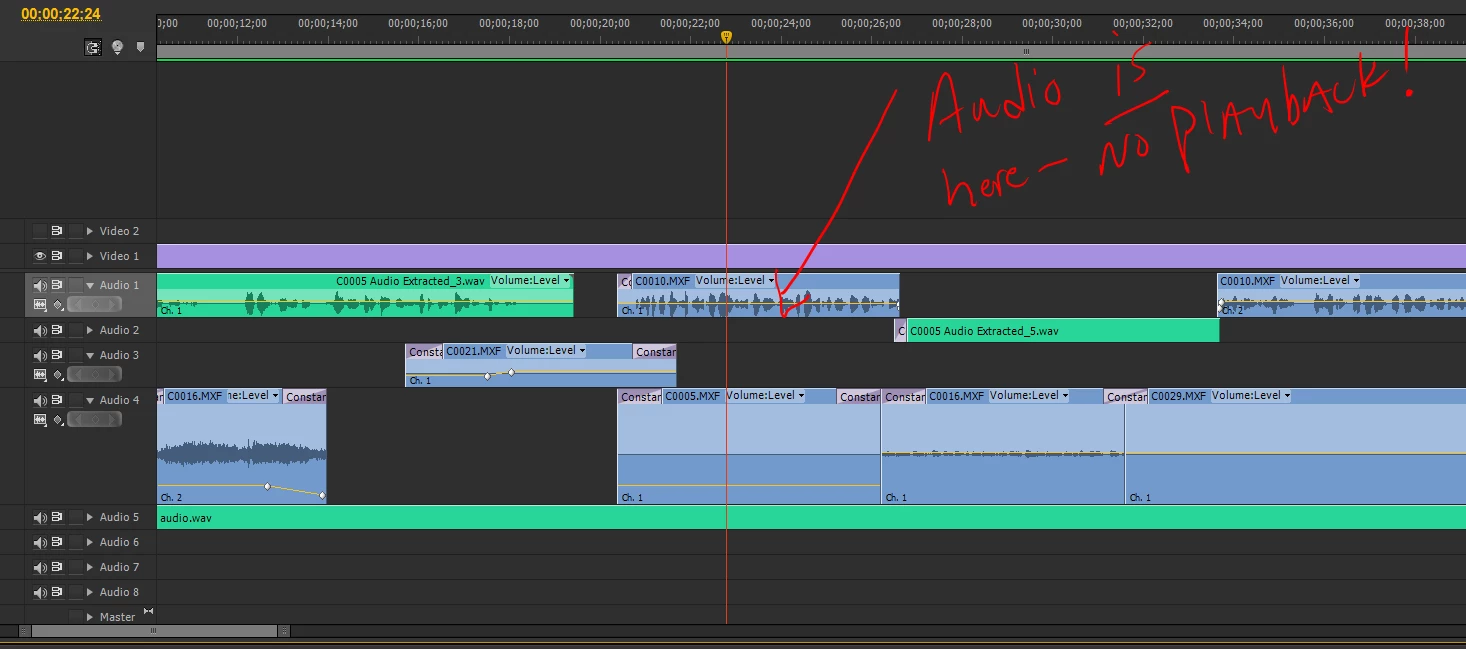
I've been experimenting with various work-arounds... I've used the "match frame" to find the exact spot in the source monitor... then I choose "repalce clip with source monitor" and the audio is replaced and plays... The trouble is when I fix one clip, another pops up.

Even wilder:  Some clips play a portion and then the audio stops suddenly in the middle of the clip!

I've shut down Pr and fired it back up.... that works sometimes... not always.

I've rebooted... works sometimes, not always...

Now the system is hanging up and crashing! 

I'm trying to get the project out!  I have the client in the room, and this is not looking good!  "Why don't you just use Final Cut Pro like everyone else?" 

I'm looking for answers and solutions.

Thanks,

Curt

Worth noting:  I had both CS6 and CS5.5 installed on the system when this project originated... I had so many system crashes, I decided to remove BOTH last weekend, run a registry cleaner and then reinstall CS6.  That seemed to clear up many issues, but not the dropping of the audio.

This topic has been closed for replies.

10 replies

Participant
May 27, 2015

Holy shit, this problem has been around for 3 years, and there's still no fix? I just had almost all my audio vanish on me on a short project.

October 22, 2012

Here is the problem. Adobe Premiere doesn't play well with external sound cards of many brands. I have proven this. When my audio drops out as it does a few times a day, I switch to the stupid computer speakers and it works. I switch back to my studio speakers and no sound is playing. I have heard this issue time and time again and I am hearing of it in CS5 and CS6 so Adobe has no immediate concern on fixing this horrible issue. You need to call Adobe and complain and demand a fix.

Adobe Employee
October 22, 2012

Hi Jack Attack,

This seems like your issue is a separate issue to the one being discussed here.  If you bring attention to this in a new thread that will call attention to your issue.  Please provide the information in this thread (http://forums.adobe.com/thread/961741?tstart=0) so we can get a full picture of your system.

Also, filing a bug report is always a good idea.  You can do that here - https://www.adobe.com/cfusion/mmform/index.cfm?name=wishform

October 23, 2012

thank you so much. I will do both things you suggested.

Participant
September 6, 2012

I've had this same problem and have been quite unhappy with how long it has been taking Adobe to fix.

Let's hope this update released yesterday (9/6/12) will fix the problem!

http://blogs.adobe.com/premiereprotraining/2012/09/premiere-pro-cs6-6-0-2-update-hidpi-for-retina-display-bug-fixes-and-new-supported-gpus.html

Participant
August 1, 2012

I am having massive issues also. I am using the Canon XF100 and premiere. There is currently no solution to importing the MXF files into premiere.....

What's going on Adobe?

Participating Frequently
August 1, 2012

Maxwell84 wrote:

I am having massive issues also. I am using the Canon XF100 and premiere. There is currently no solution to importing the MXF files into premiere.....

What's going on Adobe?

Well, there is a workaround... I outlined mine above.

However, I just did a new short project that was a single camera shoot and and hour long, so there were several spanned clips, and I had *no* issues.

What I did different was before importing into PPr, I used the latest version of Canon XF Utility (1.3) to merge the clips together into one large MXF file, then imported that.  PPr did NOT render the audio, just created a PEK file.  I cut out the stuff I didn't want, added dissolves, titiles, an extra audio bit, and exported... Didn't lose the audio once.

So try using the XF utility first, you may have better results.

Known Participant
August 1, 2012

Actually Dave is right, Canon MXFs seem to behave better when transferred using that utility rather than copying the whole card to a folder and using the Premiere media browser to import into the project. But that doesn't help the audio problem at least in my case. What it helped was a weird glitch I had when copying the card structure to a folder and then importing through the media browser, where there would be glitches in the footage, similar to drop-outs from digital tape. However, when watching the same exact portion on the camera there were no glitches. I tried using different cables, even taking the card out of the camera and using the computer's card reader, but the glitches were still there, and not always in the same places, which told me it might be a bug in Premiere. But importing using the Canon Utility solved this. The only problem with this is that a lot of metadata information is not transferred when using the "Export to MXF" function. Using the Backup function is the same as copying the folder structure to the hard drive, it still shows those glitches.

I haven't experienced the sound bug again after I posted the first time, so it seems to be totally random.

Participating Frequently
July 13, 2012

Curt,

Im convinced that this is a bug in CS6. The issue I am having is more or less identical to yours: Im using XDCAM HD422 and IMX Pal 25P footage. In both cases, some clips will randomly and apparantly arbitrarily stop playing back, despite as you point out, still showing as online and with waveforms. The files continue to be absent when exporting the timeline. Restarting Premiere will temporarily restore the audio from the files, but changing focus to another application seems to be enough to trigger the issue again. It also spontaneously reoccurs after a nonspecific/inconsistent interval.

Considering the fact that the MXF codec was apparantly missing or incompletely implemented in the first release of CS6, logic would seem to suggest that this problem is related. I havent tried the workaround of deleting the conformed audio, but I certainly will.

@Kostas: Im surprised to read your MXF file imports now appear slower. My situation is exactly the reverse; importing is easily 4x as fast as in CS5.5, and the conforms do their business quietly in the background while still allowing me to work. A big improvement. Now if they'd only stop disappearing

Mitch W
Participating Frequently
July 13, 2012

Adobe has now been able to reproduce the issue (with the help of some of you here on the forum - thank you very much!) and is working on a fix. You aren't crazy. It is an Adobe issue. Don't bother deleting the conformed audio files, it won't help in this case.

@thirdeyeamsterdam - what did you mean when you said the MXF codec was apparently missing or incompletely implemented in the first release of CS6?

the_wine_snob
Inspiring
July 13, 2012

Mitch,

Thank you for that update. Many will be happy, when the work is done on this problem.

Appreciated,

Hunt

July 12, 2012

Yes, PLEASE FIX THIS

Same problem as the OP here, totally different system...my specs:

MAC (mid 2010) OSX 10.7.4

2x2.93 6-Core Intel Xeon

NVIDIA Quadro 4000 (only common element)

24 GB RAM

Using XDCAM HD clips

I've done the make a .aif file after clips are editied, which is a sad solution for me as clients always change their minds. It seems that PR is just not handling the MXF audio correctly. Of the several issues I am having with PR this is the one causing me to think "deal breaker"...the randomness of how this happens makes it impossible to replicate other than saying just edit some MXF clips and it will happen.

I am currently using some clips for a new project (not giving up yet) that I used "import" from my PDW U1 instead of "export"...which puts the clips in a mov wrapper and the audio is now lpcm...after a couple of hours of editng it is still working with only one odd audio incident in the source monitor, which is a different glitch.

I just hope the engineers are working to fix this (and other problems), and not push out CS7...PR could be a wonderful editor IF it could be stable!!

Kostas Arvanitidis
Inspiring
July 12, 2012

Any updates on the issue? We've tried every workaround possible. But the problem isn't stable. Meaning opening a project might cause the audio issue and re-opening might bring back the audio... or might not...

My guess is that there's something wrong with the MXF importer. Long import times are a symptom too.

Participant
June 29, 2012

I also installed two external sound cards to test whether the problem is hardware, but problem continued. Interesting that i have files on timeline .mov .mp3 .wav and these don't have problem. Only audio mxf files recordeds with sony pmwf3 that exports yours files in mxf op1 disappears.

Participant
June 29, 2012

Excume by my english. I am brazilian. I have the same problem. I did all the solutions presents in this forum but the problem didn't stop. I will like that adobe employees resolve this. In cs5.5 this problem didn't occurs.

Participating Frequently
June 29, 2012

Yes, I'm still having the problem too.  I just started a new project and I tried the suggestions above with no joy.  I tried to interpret the two mono clips as one stereo and it still happens.  Tried dumping preferences and cache, no luck.  I seems to be related somewhat to multi-tasking on my computer, but I can't prove it.  It just seems that if I'm doing something else (like printing DVD's) while I'm editing, I'll lose the audio when I switch to the second application and switch back.  But I'm not sure.

I thought it was because the source MXF files are on a third drive on my system and it was going to sleep, but then I think I would also lose the video too, as if the media is offline.  I *never* lose video, just audio.

I've resorted to rendering and replacing the audio on my edited timeline after I make all my cuts.  But before I run it, I always reboot and just run the render and replace before anything else.  I then examine the resulting WAV file in the source monitor to see if all the audio is there.  A couple of times when I tried before I did the reboot step, I would see dead people sections of the waveform.  Trash it and try again.

But once I have a good rendered WAV file for the audio, then there's no problem.  I'm convinced it's related to the MXF file.  My timeline typically consists of two camera tracks with audio and a third audio track from a digital recorder which is WAV format.  I will lose one or both of the camera audio from time to time, but never the audio from the digital recorder.

Participating Frequently
June 13, 2012

Curt,

I've experienced the same thing.  I have a multi-camera sequence of spanned video clips (MXF format) with two video tracks, four mono audio tracks (each camera shoots L-R in mono, so two audio tracks per video) and a fifth stereo audio track for ambient audio.  I cannot re-recrate it on demand yet, but the audio of one of video tracks will just disappear as you describe.  I can see the wave form, but nothing plays.  I can scrub to the next clip and the audio returns, so it is just a clip.  I have not seen it drop out in the middle of a clip. 

I can close PPr and re-open it, and all the audio is back.  I think it may have something to do with the media cache, but I'm under deadline and I don't have the time to experiment right now.  I have not had any issues with the audio during the multi-camera edit or exporting the video (knock on wood).

Mitch W
Participating Frequently
June 14, 2012

Hi Dave,

I just talked with Curt and he appears to have fixed the issue by trashing his prefs and the PluginCache. Give it a try and see if it fixes the problem for you too. Hold down the Shift key and the Alt key (Windows) or the Shift key and Option key (Mac) and then lauch Premiere Pro. Holding down the Shift on launch deletes the PluginCache. Holding down the Alt/Option key on launch deletes the prefs.

If this does/doesn't work be sure to post back here.

Curt PairAuthor
Participant
June 14, 2012

Dave,

I think it should also be mentioned that when you Launch Premiere Pro... do it from the START MENU, and NOT a short cut!  Launch from the start menu, with Administrative Privledges... Keep the buttons HELD DOWN until the "splash screen" appears... that's how the whole deal works! 

Good luck!