JeremyAndrewDavis
August 11, 2026
Answered

Audio exporting 2db quieter than timeline

  • August 11, 2026
  • 9 replies
  • 32 views

My audio is consistently exporting quieter than my timelines.


To test this I imported a wav file,

  1. created sequence from the file so all settings match,
  2. made sure audio clip mixer is 0,
  3. made sure audio track mixer is 0,
  4. matched sequence settings to export settings, (mono staying mono, matching hz, matching bit rate, etc)
  5. ensured effects were off (like loudness normalization being off)
  6. exported wav to same settings as original file.
  7. I then re-import the newly exported file into Premiere and it is 2-3db quieter than the original.

Please help. Thanks!
    Correct answer Averdahl

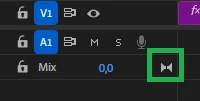
    Look at the attached image, that track has a stereo mix indicated by the two speaker icon.

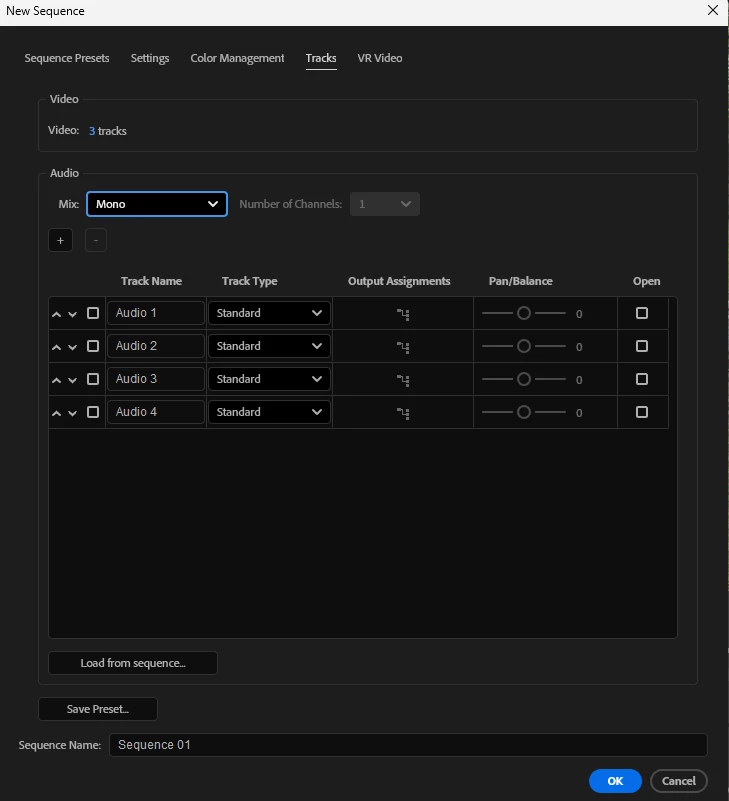
    You cannot change the Mix for an existing timeline, this has to be done when you create the timeline. You can however create a new timeline with a Mix set to Mono by going File > New > Sequence. Click on the Tracks tab. When done, just copy over the media from the timeline you are working with.

    But be aware of that if you place music on your timeline it will export as mono and that´s definitely not a good thing. Staying in a timeline with the Mix set to Stereo and just bump up the mono audio to compenaste for this is imho always the preferred way to go. Depending on what to do with the video that is. 


    9 replies

    R Neil Haugen
    Legend
    August 11, 2026

    Averdahl beat me to it … this most often occurs when using mono on  a stereo sequence. Which is why many of the folks I khow create their own list of custom sequence, and always create sequences by New Sequence/X preset rather than say drag/drop or whatever. That way they get no surprises.

    Everyone's mileage always varies ...
    JeremyAndrewDavis
    August 11, 2026

    So I used the -right click file -> new sequence from file, to avoid this very issue. When I right click and create new sequence and then attempt to set sequence settings, there does not seem to be any option to select mono under the audio settings.

    Can you point me to where I can set the sequence settings to mono? Thanks.

    Averdahl
    Community Expert
    Community Expert
    August 11, 2026

    It sound like the panning law in action. Often (always) caused by mono tracks on the timeline while the Mix track is set to Stereo. This will result in lower output. Google for panning law for more in depth detailed info.

    JeremyAndrewDavis
    August 11, 2026

    Thanks.
    I’m not finding any information on how to set the timeline mix tracks to mono to avoid this issue (or test that it is indeed the cause)? My mix tracks don’t seem to have an indicator saying whether they are set to mono or stereo, nor a way to change them. Do you know how?

    Appreciate it!

    Averdahl
    Community Expert
    AverdahlCommunity ExpertCorrect answer
    Community Expert
    August 11, 2026

    Look at the attached image, that track has a stereo mix indicated by the two speaker icon.

    You cannot change the Mix for an existing timeline, this has to be done when you create the timeline. You can however create a new timeline with a Mix set to Mono by going File > New > Sequence. Click on the Tracks tab. When done, just copy over the media from the timeline you are working with.

    But be aware of that if you place music on your timeline it will export as mono and that´s definitely not a good thing. Staying in a timeline with the Mix set to Stereo and just bump up the mono audio to compenaste for this is imho always the preferred way to go. Depending on what to do with the video that is.