Inspiring
July 2, 2015
Answered

Audio Hardware Changes in Premiere Pro CC2015

  • July 2, 2015
  • 19 replies
  • 31105 views

There seem to have been some big changes in the Audio Hardware preferences in the jump from CC 2014 to CC 2015.

I am using Premiere on a MacPro. In CC 2014, under Audio Hardware, there is an ASIO Hardware section where I was able to set the Adobe Desktop Audio to "System Default Input/Output." This was perfect because if I changed my system output from headphones to line out, Premiere would follow suit.

In CC 2015, that option has disappeared. There is a  Device Class dropdown, but the only option I'm given is "CoreAudio." In the default input and output options below there is no option to respect the system's input/output. Therefore, even if I have changed my system output to be line out, Premiere continues to just use the headphone output.

Is it possible to get that old functionality in CC 2015? Am I just missing it somewhere? In the help documents for 2015, it seems to suggest ASIO hardware options are only available for Windows and CoreAudio only for Mac. Why is this the case? It was available in 2014. I would appreciate any insight or help in this matter.
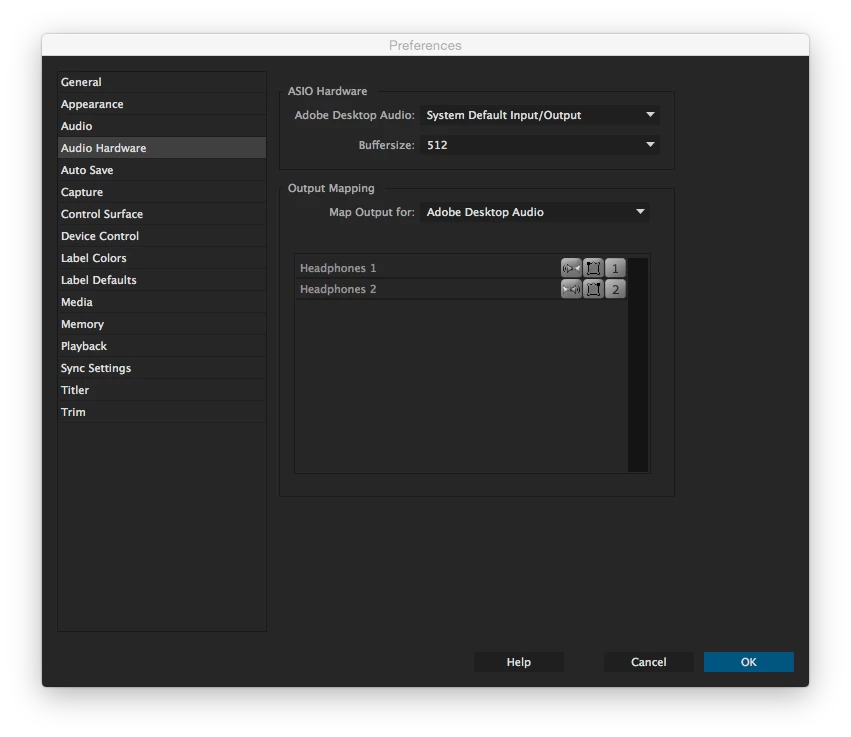
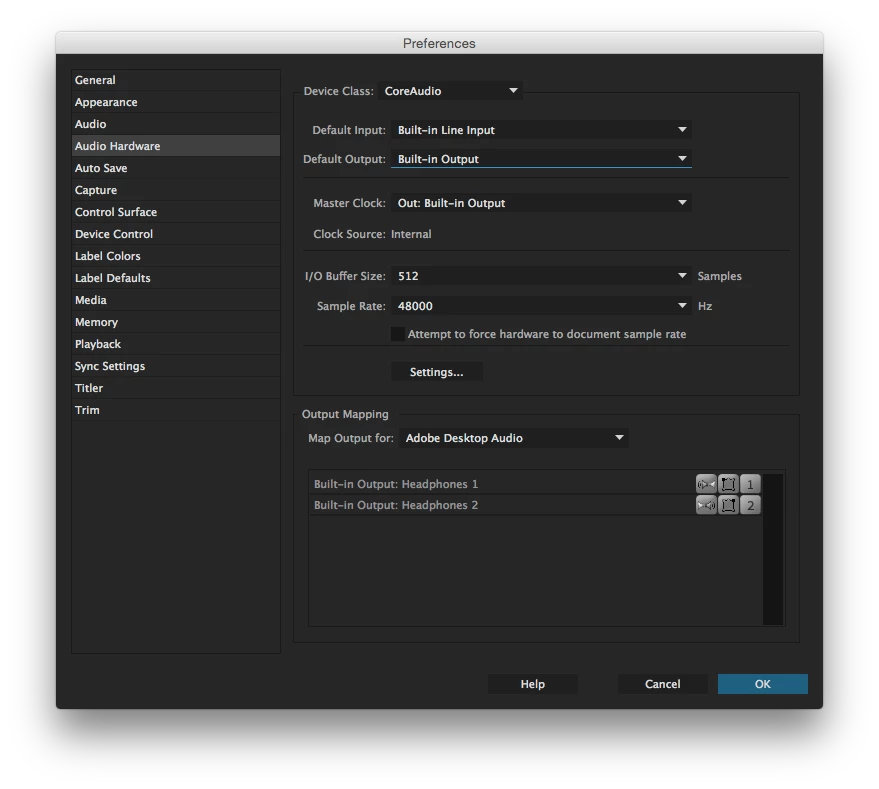
This topic has been closed for replies.
Correct answer JaredCreel

This was finally addressed in the 14.2 update. Only took 5 years to get it done, but better late than never!


https://adobe-video.uservoice.com/forums/911233-premiere-pro/suggestions/33897754-fix-the-default-audio-output-for-imac-pro


19 replies

stuart_mccoy
Participant
February 24, 2016

I'd like to add my voice to this issue, and yes, I did file a feature request (I see this a new feature, not necessarily a bug). There really needs to be a "system default" option in the audio hardware settings (for both input and output really, but in this case, for output) that monitors the settings in OS X to determine which source to use as output. As others have already stated, I too use my headphones while assembling and editing before sharing with others for feedback when I switch to my external speakers so others can hear the audio. Since I'm new to using Premiere Pro for such a large project, this is the first time I've really had to deal with this issue and while I can work around it by switching settings in both OS X and Premiere Pro, I really shouldn't have to.

Participant
January 12, 2016

Add me too. This is beyond a joke.

Kevin-Monahan
Community Manager
Community Manager
January 13, 2016

Please file a bug, Carl. There is no better way to voice a complaint.

Kevin

Kevin Monahan - Sr. Community and Engagement Strategist – Adobe Pro Video and Audio
roberts92449685
Participant
December 15, 2015

Add me to the list.  Switching between headphones and speakers is such a common practice for editors that I find it hard to believe it could get past an Adobe update.  ADOBE, PLEASE FIX!!!

Kevin-Monahan
Community Manager
Community Manager
January 13, 2016

Add me to the list.  Switching between headphones and speakers is such a common practice for editors that I find it hard to believe it could get past an Adobe update.  ADOBE, PLEASE FIX!!!

Sorry, there is no list. We compile issues via bug reports. Please file one.

Thanks,

Kevin

Kevin Monahan - Sr. Community and Engagement Strategist – Adobe Pro Video and Audio
Participant
March 2, 2016

It's not a bug.. I don't understand how that's not getting across. It's a feature that was there, and is now not there. Plain and simple. I wish you guys were more honest and just say you won't bring back this feature.

Participant
December 7, 2015

Just tacking on to what others have said - this is extremely annoying to have to go through several menus just to change the audio output. Can you explain why this is no longer tied to the system audio? I change from my headphones/speakers daily and it is the most cumbersome process to have to dig through menus and remember which output is which when switching between apps. For other people in this forum, the only thing I can think of as a temporary work around is an A/B Switch - Amazon.com : Sescom SES-IPOD-AB iPod Stereo Audio MP3 FLAC WMA Player A/B Switch 3.5mm (1/8) : Electronics

Kevin-Monahan
Community Manager
Community Manager
January 13, 2016

Hi Derrick,

Did you file a bug yet? Please do so.

Thanks,

Kevin

Kevin Monahan - Sr. Community and Engagement Strategist – Adobe Pro Video and Audio
Participating Frequently
February 4, 2016

I filed both a feature request (one click audio switching) and a bug report (no audio playback control when audio mapped to line out) with link outs to this forum thread included.

O

Known Participant
September 16, 2015

I'm just chiming in to say that this annoying change happens on PC as well. It's a move for the worse in my workflow. Please address this soon Adobe.

Participating Frequently
September 16, 2015

I found this forum because I am experiencing the exact same frustration. I just finished a session with a producer abbd had to repeatedly apologize for getting up and setting the audio levels manually since I have no control over levels when audio is mapped to line out; the only option for playing audio through my monitors.

And going into preferences every time I want to toggle between headphones and speakers is a huge time waster. Please fix.

Octavio

PS For those on OSX who do not want to fuss with automator and scripts to toggle between headphones and speakers, you can option-click on the volume control (make sure you have selected 'show volume in menu bar' under audio preferences) and a drop down menu with all the available audio inputs and outputs will appear for.

:-)

Participating Frequently
September 11, 2015

Also looking for resolution here. I've always used an option-click on the system audio icon to switch from headphones to speakers for the very same reasons. This is a major step backwards for those who work in an area where they use both headphones and speakers regularly.

Participant
August 25, 2015

I am having the exact same issue and am also very frustrated that this past functionality has disappeared.  Having the ability to switch quickly between headphones and desktop speakers is very valuable when offices are in close proximity.  I had tried just switching the output within Premiere Pro, but by doing that I lose the ability to easily control the volume level.  Please fix this ASAP!

Vic

Participant
August 25, 2015

Indeed this is frustrating.  What I find amusing is that After Effects traditionally did not have the "System default" as an audio hardware option.  However, in CC 2015 After Effects now has this feature, yet it was stripped out of Premiere (where it is arguably more useful).

Adobe, please correct this.  Premiere will let you manually choose any of the system output options, so clearly it's not a limitation of excluding certain outputs.

Participant
August 26, 2015

Ha!  I hadn't noticed it there.  The other problem I'm now realizing is that since I determined I could just use the System Volume control with my powered Alesis Speakers I removed any kind of external volume control.  This new update now means that I can't control my desktop audio except with the audio mixer within Premiere!

This NEEDS to be fixed!  Adobe, please help!

Vinay Dwivedi
Adobe Employee
Adobe Employee
July 2, 2015

Hi jared,

On CC 2014 it shows ASIO hardware so you might be using some ASIO supported hardware (recording device). An equivalent to ASIO on Mac OS X is CoreAudio, which was designed with low latency in mind and is the default driver on MAC.

You can understand it in the same way as Premiere Pro is detecting that recording device as it is plugged in but MAC core Audio is communication with the same device using ASIO. This might be the case if Device fails to register as a core audio device and take a other way rount to communicate with the core audio (In your case you can say it is ASIO).

ASIO wasn't meant to be used for playback purposes either way, it's meant for recording where you want to be able to set a low latency.

In CC 2015, The complete audio stucture is Enhanced and it looks similar like Audiotion Preferences and gives you many recording and playback features (Hardware Backed) to set Master clock and set the Output and input device perfectly with desired sample rate.

So, for now you cannot set your Desktop Audio to Default input/output as they both are now configured separeately in CC 2015.

Hope this helps.

//Vinay

Participant
August 6, 2015

I too am frustrated by this change.  I would change my system default several times a day to hear differences in mix between headphones and monitors, to spare other editors from hearing me work or to specifically share progress with others.  I have Quicksilver installed with a script to switch my system audio preference with the press of a single button, however that is now useless.

For what reason can you not allow a default system audio option when CoreAudio is what the OS uses?

This is an irritating step backwards.

Vinay Dwivedi
Adobe Employee
Adobe Employee
August 6, 2015

Hi Kyle,

Have you installed the latest update 9.0.1 for Premiere Pro CC 2015?

If not please try to update and check if the issue persists.

//Vinay

Vinay Dwivedi
Adobe Employee
Adobe Employee
July 2, 2015

Hi Jared,

Please check the below link and check if it helps.

Adobe Premiere Pro Help | Preferences

//Vinay

Inspiring
July 2, 2015

Hi Vinay,

I have indeed read that document. I mentioned in my original post that it seems to suggest ASIO hardware options are only available for Windows and CoreAudio only for Mac, though in CC 2014 I have settings for ASIO hardware that allows me to do what I need. I'm wondering where that option has gone (for Mac users I suppose) and if there is any way to get Premiere CC 2015 to handle the default input/output as it did in 2014.

Thanks,

Jared