Participant
December 10, 2021
Question

Audio Line

  • December 10, 2021
  • 2 replies
  • 481 views

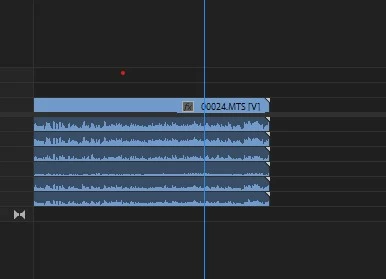
In the premier 2021 I get 6 lines of audio on the timeline.

It is impossible to work with 6 lines.

How to make it one line again?
  

This topic has been closed for replies.

2 replies

Community Expert
December 13, 2021

It looks like your audio is 5.1 surround, you will need to go to your file in the project panel, right click and select modify clip. The settings below or something similar might work:


neil wilkes
Legend
December 14, 2021

When I am working with 5.1 audio, I find it is far, far better to set up the sequence manually with the settings you want.

You may also need to take a side-trip through an Audio tool to recombine the 6 mono split files into a 5.1 interleaved file.


I'll also check the suggested solution above here & see if that works for me.

I'll post back later.

Participant
December 15, 2021

I DID WHAT YOU SUGGEST

IT WOEKS!

dO I HAVE TO dO IT NOW TO ALL THE CLIPS?


Inspiring
December 13, 2021

Looks like your camera has recorded 6 mono tracks. You can delete the tracks you don't need from the sequence - or in your project window/bin - select all the camera clips, right click, select 'Modify' > 'Audio Channels' > in the pop-up window 'untick' the channels you don't need. Also choose your clip channel format (probably 'Mono' in your case).


Note: this will NOT change any clips already in your sequence.

Participant
December 13, 2021

ןstill have a problem.

i get all 6 lines separeted

I want this format 

all 6 in one line>
