
craignotfamous
Known Participant
March 24, 2020
Question

Audio missing from start after export

  • March 24, 2020
  • 6 replies
  • 1817 views

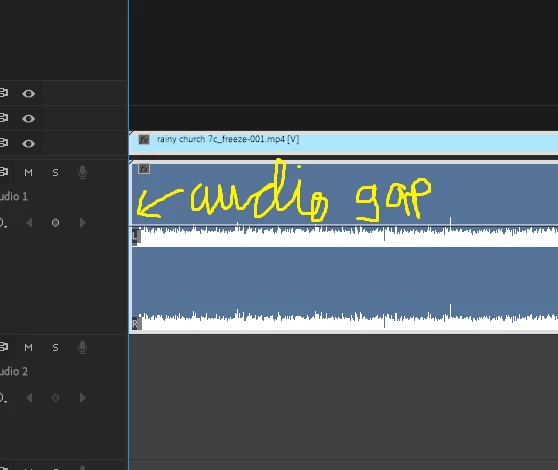
I have been trying to add my own audion to a short animated picture. The video is mp4 and I am trying to add a wav file that i made. I have check over and over agin that they are the same length before exporting, but the result always has a small missing bit of audio at the start of the rendered file. i have tried different setting, I've treid doing it i n quick time, I've tried taking the video and adding the audio in avidemux, every timer I get the same result, a small gap at the start of the file on the audio track.


I t might not be such a problem, but the final video is supposed to be looped, but it can't be as there's a noticeable skip in the audio at the join.


I'm still quite new to this so any advide will be appreciated, bearing in mind I've been trying to solve this for about 18 hours straight now.


thanks, oh and here's a picture
This topic has been closed for replies.

6 replies

Legend
March 25, 2020

by default (I think) Premiere will start playing the area after that section has been rendered.  Did it fix the problem.  

You need to answer all the questions if we're going to be able to track down the problem.  

the other questions were

After it renders does it play back properly?

are you on the mac or the pc?  If the mac, export as prores 422 which will be better quality than mp4's (but much larger files).  Again, just try the first few minutes and see if it makes a difference.  


And if anything in the questions is not clear, let us know.

craignotfamous
Known Participant
March 25, 2020

It didn't appear to render, it just starts playing 

craignotfamous
Known Participant
March 25, 2020

Soory, also I'm on pc

Legend
March 24, 2020

try this.  select your audio track in the timeline and go to sequence menu:  render audio.  After it renders does it play back properly?


are you on the mac or the pc?  If the mac, export as prores 422 which will be better quality than mp4's (but much larger files).  Again, just try the first few minutes and see if it makes a difference.  


We'll figure this out.  

craignotfamous
Known Participant
March 25, 2020

Not entirely sure what I'm doing here, but I selected the track, sequence > render ausio and it starts playing.

Legend
March 24, 2020

I think there are some very basic facts that we don't have yet.  


what's the sampling rate of the audio file?  48k 16 bit is generally recommended for video.  So you might try resampling the audio if it's not 48k 16 bit.  What happens if you simply select all in the timeline and shift it down 5 seconds and then export.  You do not have to export the whole sequence, just mark an in and an out in the timeline and make sure export in to out is chosen in the export dialog.  If this export includes the beginning of your audio, we can probably figure out a workaround...  The discrepancy in the duration is probably because of the difference between drop frame and non drop frame timecode.  


And send us your sequence settings and your export options.   All clues to help us figure out what's going on.

craignotfamous
Known Participant
March 24, 2020

I have tried both 48k and 44.1, will ttry again though. I also already tried moving the clips down the timeline, it was one of the first things I thought of as it happens in DAWs as well which I'm more experienced in.


sequence settings is 25fps ( i know but I thhought this is ok for basic piture animation) 1920/1080


Export I have tried h264 vbr 1 pass at various taget bitrates from 10 to 16 audio aac 48k

also h264 cbr at various target bit rates and also quicktime aple pro res 422


Let me klnow if I missed any imoprtant info here, I'm new at this so there is probably something I don't even realise is importtant.


Also thanks guys for helping me

craignotfamous
Known Participant
March 24, 2020

Again sorry about the typos, I just read that back, not having my best day today

Community Expert
March 24, 2020

Are you using the denoiser effect on the wav file, this can cause problems with the start of audio clips.

craignotfamous
Known Participant
March 24, 2020

I used no denoiser on the wav when I made it (I made it in reaper DAW, been using it for more than a decade)

and I just added the wav to the mp4 in premiere and renderd, no effects, nothing.

Legend
March 24, 2020

by any chance is the video shot on an iphone or part of a screen recording?  If so, the problem may be a variable frame rate.


This program will tell you all the details of your source file

https://mediaarea.net/en/MediaInfo/Download


And here's a FAQ about variable frame rate problemshttps://community.adobe.com/t5/premiere-pro/faq-issues-with-screen-recorded-footage-in-premiere-pro/td-p/10874355?page=1

craignotfamous
Known Participant
March 24, 2020

No it's not. It's images from illustrator and photoshop. Basically a picture amde in those programs and brought into premiere and animated a bit. there are no complicated parts in the final render when I get this problem, all the video is done before and exported to it's final state, I'm literally just trying to add an audio track to 1 video clip.

Ann Bens
Community Expert
Community Expert
March 24, 2020

You made the wav yourself: there is where you should look.

Is it missing audio or does it start other then 00.00

craignotfamous
Known Participant
March 24, 2020

Also, sorry for the typos, I have nerve problems and struggle with it