


Answered
Audio Mono Stereo
I have a clip that is Mono. When I play it in the preview window it is is Mono. Then I drag and drop it into an new timeline, hit yes to copy the settings from the clip and THEN IT PLAYS STEREO on only one side! How can I fix this. I just want to drag and drop it and have a Mono sound. If I try to export it now as an Mono, this works - but only for the first Audio line. As soon as it has several Audio lines, it exports just the first one as Mono and the rest won't be in the video anymore. Thank you for helping me out.
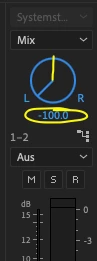 Thank you! I could fix it! It was all the way to L - now I put it back to 0 and i have it again on both sides.
 AdChoices