


Martine27000009zfkr
Inspiring
June 3, 2026
Answered

audio not exported

  • June 3, 2026
  • 4 replies
  • 32 views

I have added some audio to my Premiere Pro project as you can see below. It plays perfectly in the Preview but it does not get exported. Why? What’s up, please?
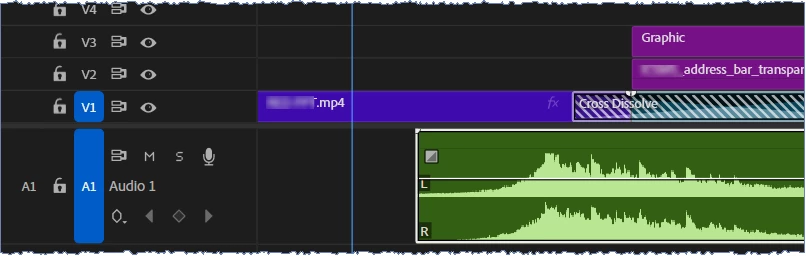


    Correct answer Martine27000009zfkr

    I finally managed to fix my audio problem by converting it to 48000 Hz in Adobe Audition, and then moving it back to my Premiere project. The audio now plays after export.
    Thank your for your time.

    4 replies

    Martine27000009zfkr
    Martine27000009zfkrAuthorCorrect answer
    Inspiring
    June 3, 2026

    I finally managed to fix my audio problem by converting it to 48000 Hz in Adobe Audition, and then moving it back to my Premiere project. The audio now plays after export.
    Thank your for your time.

    Martine27000009zfkr
    Inspiring
    June 3, 2026

    And will this fix my audio issue?

    Martine27000009zfkr
    Inspiring
    June 3, 2026

    So, do you mean that I should fix the frame rate issue on the exported mp4 (using that external app called Handbrake) and not on the project within Premiere?

    Peru Bob
    Community Expert
    Community Expert
    June 3, 2026

    do you mean that I should fix the frame rate issue on the exported mp4

    Not the exported file, but the original media before importing into Premiere.

    Peru Bob
    Community Expert
    Community Expert
    June 3, 2026

    Please post screenshots of your media properties, sequence settings, and export settings.

    Does it do it both with direct export and also through Media Encoder?

    Martine27000009zfkr
    Inspiring
    June 3, 2026

    Thank you very much for investigating.
    Here are my direct export settings:

    I won’t try with Media Encode because all my videos are distorted there.
