Inspiring
January 21, 2019
Answered

Audio not working with AVI file

  • January 21, 2019
  • 5 replies
  • 2034 views

Hi there,

As shown below, I added an AVI file but I cant get the audio to work, not quite sure what I'm doing wrong here??
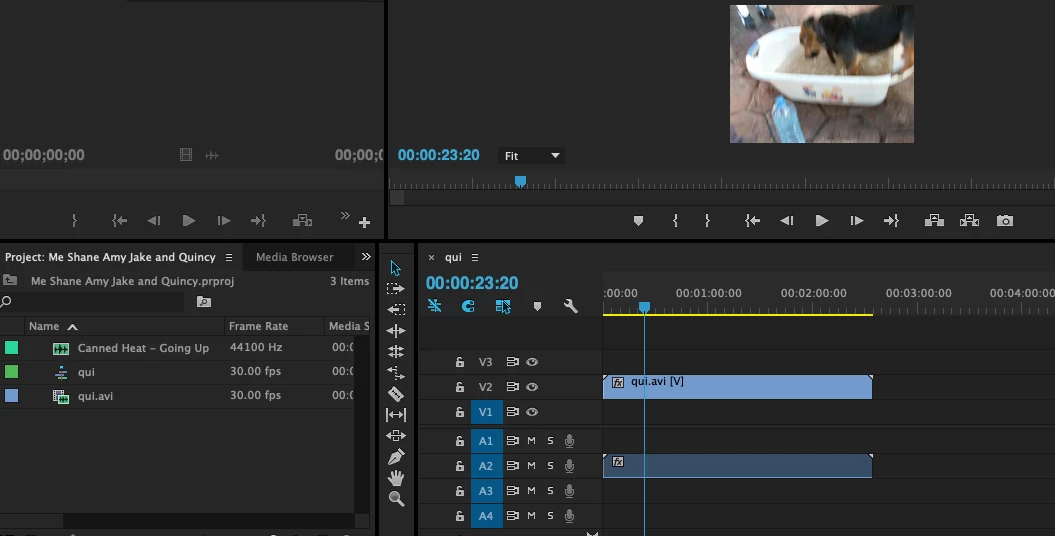
This topic has been closed for replies.
Correct answer gupta shivangi

Hi Fintang,

Sorry for your issue. I understand that you are not getting any audio waveform after creating a sequence with AVI files.

Thanks for replying John T Smith

  • Have you tried the suggestions provided by John T Smith ?
  • Please share a screenshot of the audio hardware preferences. FAQ: How do I capture and post a screen shot or video?  The path is: Preferences > Audio Hardware
  • Additionally, share the media file properties' screenshot. Select the file in Project panel > Right click > Select Properties.
  • Have you tested other formats?
  • Where have you saved the AVI files? Please change the media file location and then try to import and create a new sequence.

Let us know if it works.

Thanks,

Shivangi

5 replies

Inspiring
January 28, 2019

Hi Shivangi,

Sorry to bother you again but I have a new problem; as you can see from the below screenshot, there on no preview image or audio?

Ann Bens
Community Expert
Community Expert
January 28, 2019

Your assets are offline: relink.

Relinking offline media in Premiere Pro

Ann Bens
Community Expert
Community Expert
January 21, 2019

Alt click on audio first the right click and Enable.

gupta shivangi
gupta shivangiCorrect answer
Legend
January 21, 2019

Hi Fintang,

Sorry for your issue. I understand that you are not getting any audio waveform after creating a sequence with AVI files.

Thanks for replying John T Smith

  • Have you tried the suggestions provided by John T Smith ?
  • Please share a screenshot of the audio hardware preferences. FAQ: How do I capture and post a screen shot or video?  The path is: Preferences > Audio Hardware
  • Additionally, share the media file properties' screenshot. Select the file in Project panel > Right click > Select Properties.
  • Have you tested other formats?
  • Where have you saved the AVI files? Please change the media file location and then try to import and create a new sequence.

Let us know if it works.

Thanks,

Shivangi

Inspiring
January 21, 2019

Thank you Shivangg. Changing the media file location worked for me!

gupta shivangi
Legend
January 21, 2019

Happy to help

Regards,

Shivangi

John T Smith
Community Expert
Community Expert
January 21, 2019

That looks like you have the audio on an inactive track 2 instead of the active track 1

Source Patching https://forums.adobe.com/thread/2191265 with FAQ links

-and another FAQ that may help https://forums.adobe.com/thread/2226408

January 21, 2019

Hi, the video does not feel if you do read it from Premiere in the timeline?

If so, do you feel it on the program monitor instead?

Can you give some more details? In this way I can not tell you what I think.

Meanwhile, have you tried to go out, restart the car and come back?