
Participant
April 16, 2024
Answered

Audio only partially dragging into Premiere

  • April 16, 2024
  • 1 reply
  • 669 views

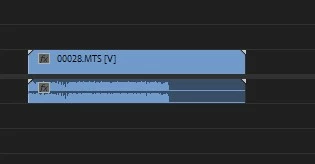
Hey all, I'm having a problem importing audio tracks from a video into Premiere (same camera/setup I have used in the past successfully). When I first dragged the file in, it only brought about 2/3 of the audio in (e.g., about 12 of 18 minutes) -- screengrab here:


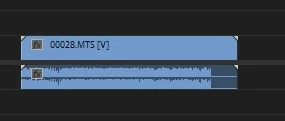
When I re-imported the video file from the camera and tried again, it brought in slightly more of the audio, but now about 15 of 18 minutes:
 

I have played the clips in Media Player (from the files as imported to the computer), and all have full audio in there; the file sizes are also comparable to similar ones with full audio. 


Has anyone encountered that and do you know how to get around it? Thanks in advance!

This topic has been closed for replies.
Correct answer Averdahl
quote

No, I only hear the audio up until the point where it seems to disappear from the track. 


By @Lori3677895266r6


O.k, then i would close Premiere Pro and then follow the instructions here to clear the Media Cache: FAQ: How to clear your Media Cache in Premiere Pro - Adobe Community - 11017257


When done, open the project you have and don´t touch anything until all media has been conformed. You will see a blue progress bar down right in the UI while the media is being conformed. Wait until it´s done.


Sometimes when one start to play around with the imported media before everything is conformed the audio can be messed up and only parts of the clip will have usable audio. Waiting until all media have been conformed often solves that issue.

1 reply

Averdahl
Community Expert
Community Expert
April 16, 2024
quote

Has anyone encountered that and do you know how to get around it? Thanks in advance!


By @Lori3677895266r6


Do you hear all audio if you playback the clip/s on the timeline?

Participant
April 16, 2024

No, I only hear the audio up until the point where it seems to disappear from the track. 

Averdahl
Community Expert
AverdahlCommunity ExpertCorrect answer
Community Expert
April 16, 2024
quote

No, I only hear the audio up until the point where it seems to disappear from the track. 


By @Lori3677895266r6


O.k, then i would close Premiere Pro and then follow the instructions here to clear the Media Cache: FAQ: How to clear your Media Cache in Premiere Pro - Adobe Community - 11017257


When done, open the project you have and don´t touch anything until all media has been conformed. You will see a blue progress bar down right in the UI while the media is being conformed. Wait until it´s done.


Sometimes when one start to play around with the imported media before everything is conformed the audio can be messed up and only parts of the clip will have usable audio. Waiting until all media have been conformed often solves that issue.