
дмитрийк50860592
Inspiring
Sep 30, 2018 1:02 PM UTC
Answered

Audio Plugins windows are cropped when opened (3k monitor)

I have 2560x1440 monitor with "Scale and Layout" set to 125% in Windows settings.

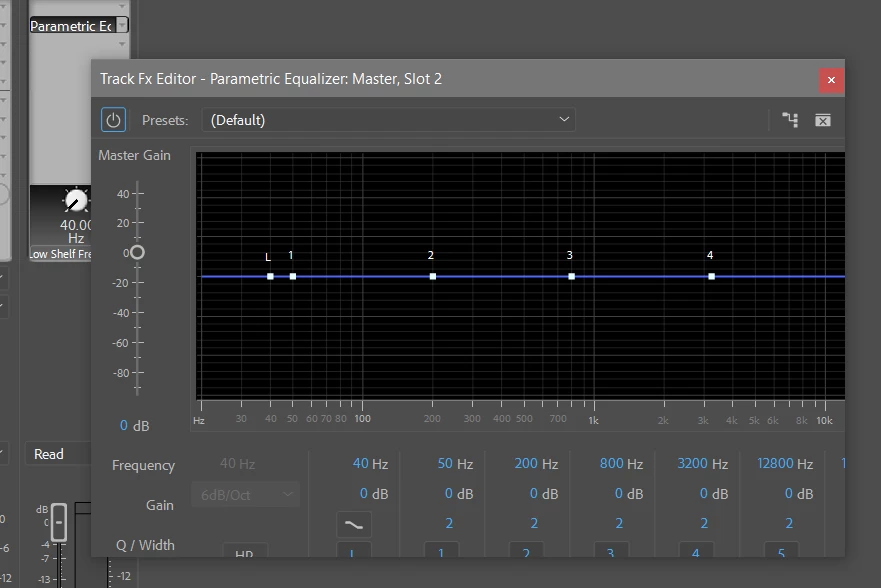
The problem is that audio plugins interface windows appear cropped. Yes, I can pull the corner to see the whole window, but it's really annoying, have to do it every time.

Setting "Scale and layout" to 100% fixes the problem but everything becomes too small to me.

And there's no such problem in Audition.

Does anybody know a fix to this problem?
This topic is closed to new replies. Start a new post to keep the conversation going.
R Neil Haugen
R Neil HaugenCorrect answer
Legend
Oct 1, 2018 2:56 AM UTC

2018 doesn't work with OS  scaling. Not a big so much as just not designed for that.

Let's hope 2019 recognizes that better.

Neil

Everyone's mileage always varies ...

8 replies

R Neil Haugen
Legend
Sep 30, 2018 5:00 PM UTC

Jim's response may be frustrating but currently it is the best general practice.

How far away from  you ... eye-to-screen ... is the monitor?

Neil

Translate
Everyone's mileage always varies ...
дмитрийк50860592
Inspiring
Sep 30, 2018 6:02 PM UTC

Thanks! I have 25 inch 2560x1440 monitor. Distance is 40-50cm something.

Anyways, it looks like it's a bug in Premiere Pro. And for me is the better just to keep resizing those windows over and over again.

Translate
R Neil Haugen
R Neil HaugenCorrect answer
Legend
Oct 1, 2018 2:56 AM UTC

2018 doesn't work with OS  scaling. Not a big so much as just not designed for that.

Let's hope 2019 recognizes that better.

Neil

Translate
Everyone's mileage always varies ...
Legend
Sep 30, 2018 1:23 PM UTC

Leave Display Scaling set to 100% at all times.  If things are too small to see, you need a physically larger monitor.

Translate