
Participant
Nov 11, 2026 8:30 AM UTC
Question

Audio randomly cutting out for one frame in the right audio channel

I have had this problem for years. Randomly in the right audio channel only, audio cuts out for one frame. There is nothing wrong with the video itself. If I have 2 files of the same video and import it to Premiere, the audio cuts will be in different places. If I import the video in another program there are no audio cuts. So I know this is a Premiere problem.

It makes editing annoying because I get a pop in my right headphone whenever there is an audio cut. I know how to copy the left audio channel for the right but I want to get rid of this problem entirely.

I’ve uninstalled and reinstalled but I don’t know what else to try.
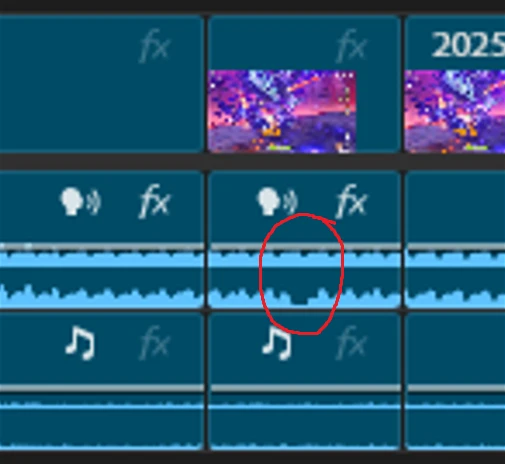
 

    1 reply

    Community Expert
    Nov 12, 2026 4:10 AM UTC

    To narrow it down, could you share the following?

    1. What recorded or produced the file? Include the capture software and its settings if you know them.
    2. MediaInfo output for the file. MediaInfo is a free tool that shows a file’s technical details. The most useful lines are frame rate mode (constant or variable), audio codec, sampling rate, and channel layout.
    3. Is the gap present in an exported file? Export a short section that includes a gap and check whether it’s still there.
    4. Does the gap move after clearing the media cache?
      1. Choose Edit > Preferences > Media Cache (Windows) or Premiere Pro > Settings > Media Cache (macOS).
      2. Next to Remove Media Cache Files, select Delete.
      3. Restart Premiere Pro, re-import the file, and check whether the gaps appear in the same places.

    You could also try converting a copy of the file with HandBrake (free):

    1. Open a copy of the file in HandBrake.
    2. On the Video tab, select Constant Framerate.
    3. Encode the file, import the new version into Premiere Pro, and check the same section for gaps.

    Note: If the HandBrake version fixes it, that’s a good workaround, but the MediaInfo details will still help confirm the actual cause.

    Translate