RonaldCz
Inspiring
November 25, 2022
Question

Audio Showing but not Playing

  • November 25, 2022
  • 4 replies
  • 2112 views

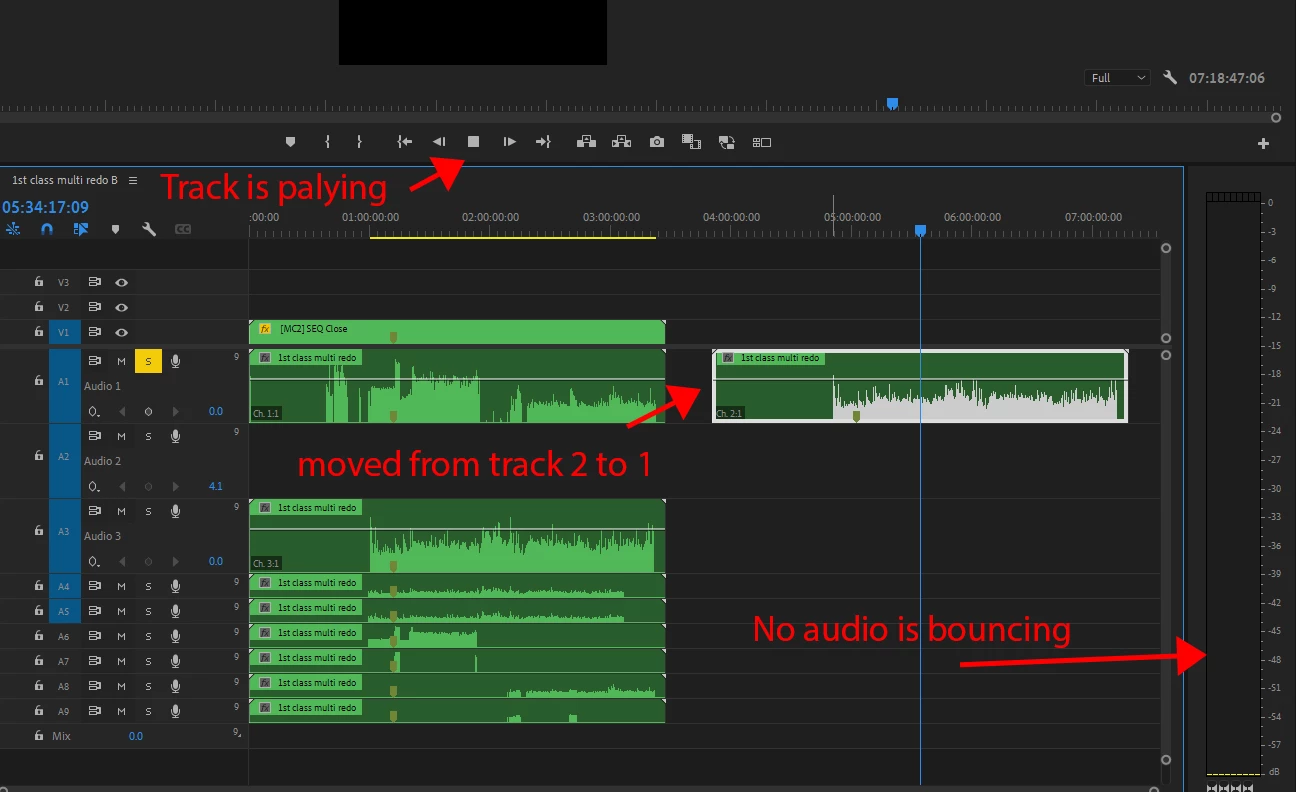
I have audio clips playing before the clip I am on and they play fine but going further down the timeline I have an audio clip not playing even though I can see the wave form.


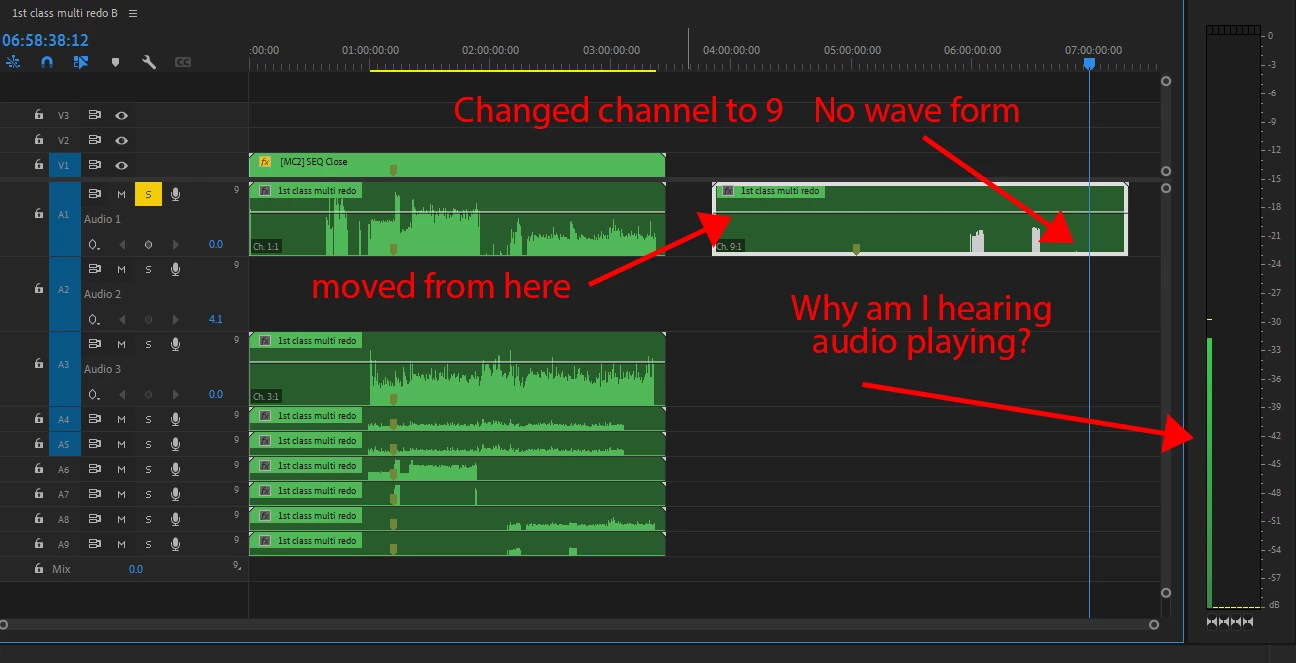
I put it on track one and have the channel set to 2 (which is the channel it came in on), because on track two it was not playing but track one was. 


This topic has been closed for replies.

4 replies

RonaldCz
RonaldCzAuthor
Inspiring
December 10, 2022

I notice when I cannot hear the track below I can click on the blue buttons but then I cannot hear the track above only that one. What are they for? I might be having a problem of nested sequences inside of nested sequences making some tracks not play their audio. 

Windows 10 64-bitGigabyte Z490 AORUS Ultra IntelLGA 1200 ATX MotherboardIntel I9-10900K CPU@3.70GHzRAM 16GBNVIDIA GeForce RTX 2070 Super& NVIDIA GeForce GTX 1650
Community Expert
December 11, 2022

It looks like you have a multitrack sequence rather than the normal stereo, is that what you require?

If you only have stereo monitoring there's a good chance you will not hear anything on the higher output channels. I don't know but I expect that blue button lets you select which of the output channels is sent to your stereo monitoring.

RonaldCz
RonaldCzAuthor
Inspiring
December 12, 2022

I did a multi camera sync with zoom, OBS and JVC camera. The sequence that came up was this I assume OBS had 6 tracks which caused this. I only wanted channel one and two in a sterio track.

Windows 10 64-bitGigabyte Z490 AORUS Ultra IntelLGA 1200 ATX MotherboardIntel I9-10900K CPU@3.70GHzRAM 16GBNVIDIA GeForce RTX 2070 Super& NVIDIA GeForce GTX 1650
Peru Bob
Community Expert
Community Expert
December 3, 2022

Try Sequence > Render audio.

RonaldCz
RonaldCzAuthor
Inspiring
December 4, 2022

After audio render the wave file was gone. I did not save  and restarted the program and saw the audio waves. I again did audio render and there was no wave again. 


I then clicked on the track and it openned up to the multi tracks below showing the camera's they came from. No matter which track I clicked on I get the same layout that opens meaning all the tracks in the first SEQ are the same repeated. The audio track 2 is still not sounding but does have wave files however I cannot hear them. 


I did notice there was track output assignments.


Windows 10 64-bitGigabyte Z490 AORUS Ultra IntelLGA 1200 ATX MotherboardIntel I9-10900K CPU@3.70GHzRAM 16GBNVIDIA GeForce RTX 2070 Super& NVIDIA GeForce GTX 1650
Community Expert
December 4, 2022

Does it play if you send the sequence to Audition

RonaldCz
RonaldCzAuthor
Inspiring
December 3, 2022

Still have the project saved and no audio bouncing. 

Windows 10 64-bitGigabyte Z490 AORUS Ultra IntelLGA 1200 ATX MotherboardIntel I9-10900K CPU@3.70GHzRAM 16GBNVIDIA GeForce RTX 2070 Super& NVIDIA GeForce GTX 1650
RonaldCz
RonaldCzAuthor
Inspiring
December 3, 2022

Here is a video to showing the problem
video link of problem 

Windows 10 64-bitGigabyte Z490 AORUS Ultra IntelLGA 1200 ATX MotherboardIntel I9-10900K CPU@3.70GHzRAM 16GBNVIDIA GeForce RTX 2070 Super& NVIDIA GeForce GTX 1650
Community Expert
November 25, 2022

It is quite rare. Your explanation is quite clear, but it will be possible for you to right click on the audio clip, Audio Channels option and show us the Modify Clip window to see the settings of that clip. Despite how you have it, the decibel meter should simply be visible.

Byron.