


Inspiring
July 12, 2026
Question

Audio time line in CS6

  • July 12, 2026
  • 4 replies
  • 41 views

I’m using the very aged Premier CS6 video editing programme. This programme has served me well all these years with only very rare problems - quickly solved.

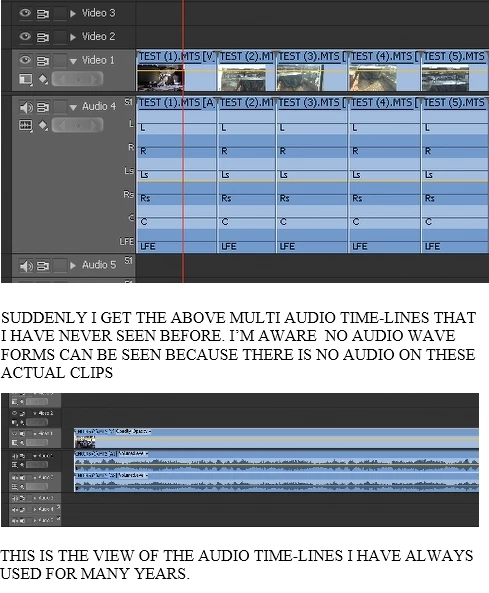
Starting a new project I now get multi line audio time lines. See top illustration in attached picture. Can anyone can tell me how to reset to my usual audio view as shown in the lower clip.
 

    4 replies

    Inspiring
    July 13, 2026

    Thanks Paul for your reply. As mentioned, I have been using CS6 for many a year, and also the previous version. I have around 200 videos on You Tube so am fairly experienced with using the programme. However I know little about all the settings, especially on the audio side. I suppose it’s like driving a car. Drive for 50 years and still don’t know how the engine works Thanks for giving me the link to the Creative Cow video very interesting and instructive. Way back I used to view many of these very helpful videos.


    Yesterday I tried looking deeper into settings and made some adjustments. When I booted up today I found that the audio on the problem project was back to what I had hoped for.

    Thank you both for your interest and help. Really appreciated.😁

    Community Expert
    July 13, 2026

    Your media contains 6 channels of audio, even though there is nothing on those channels, which is why no waveforms appear. As Ann points out, when Premiere sees a clip with 6 audio channels, it interprets it as 5.1 surround audio by default.

    Ann's suggestion will prevent this for future imports. For clips you have already imported, select them in the Project panel, go to Clip > Modify > Audio Channels, and set Preset to Mono.

    Here is an older tutorial for CS5 that may help: https://www.youtube.com/watch?v=inFgiiORp74

    Inspiring
    July 12, 2026

    Thank you Ann for your quick reply and advice that I will attempt to follow up. I would mention that at nearly aged 93 I am not quite as bright on these things as I  should be. Thanks again, I will let you know how I get on. 

    Ann Bens
    Community Expert
    Community Expert
    July 12, 2026

    Different camera?

    Might need to adjust the settings:

    When posting screenshot capture the entire panel not just a section because I  would like to see the master setting.

    When not using the 5.1 from the camera might as well set the camera to PCM stereo.